Rotten Reviews and Terrible Trolls

You will get bad reviews. It’s inevitable, I promise you. Take comfort in the fact that it’s a rite of passage all writers go through. Every – single – one of them, and after the first one has you on the floor, bawling your eyes out, and inexplicably trying to chew your own foot off for a while, they’re not so hard to deal with. Some are pretty funny, and some are just to be ignored. There are people out there who delight in trashing books, and sometimes the authors of books too, for reasons unknown to most decent humans. Sometimes it’s jealousy, and sometimes it’s just because they’re mean. Sometimes also these one star stabs to the soul are perfectly legitimate in their author’s hearts and minds, because they really didn’t enjoy what you wrote for reasons that do or don’t make sense to you. Whatever the reasons are for your one star clanger, you must never, ever, never, never, and I repeat, never respond to them. If you really need to share your pain then talk to a friend – preferably a writer friend, who will totally get you. I personally don’t think that it’s a good idea to respond to fabulous five star rave reviews either. “Liking” that wonderful review is good enough. The reviewer might actually not appreciate being gushed at by an unknown author, no matter how much you really want to catch a plane, find them, and kiss them on the lips. Reviews are for readers, good ones and bad ones. It’s best for you to let them be.

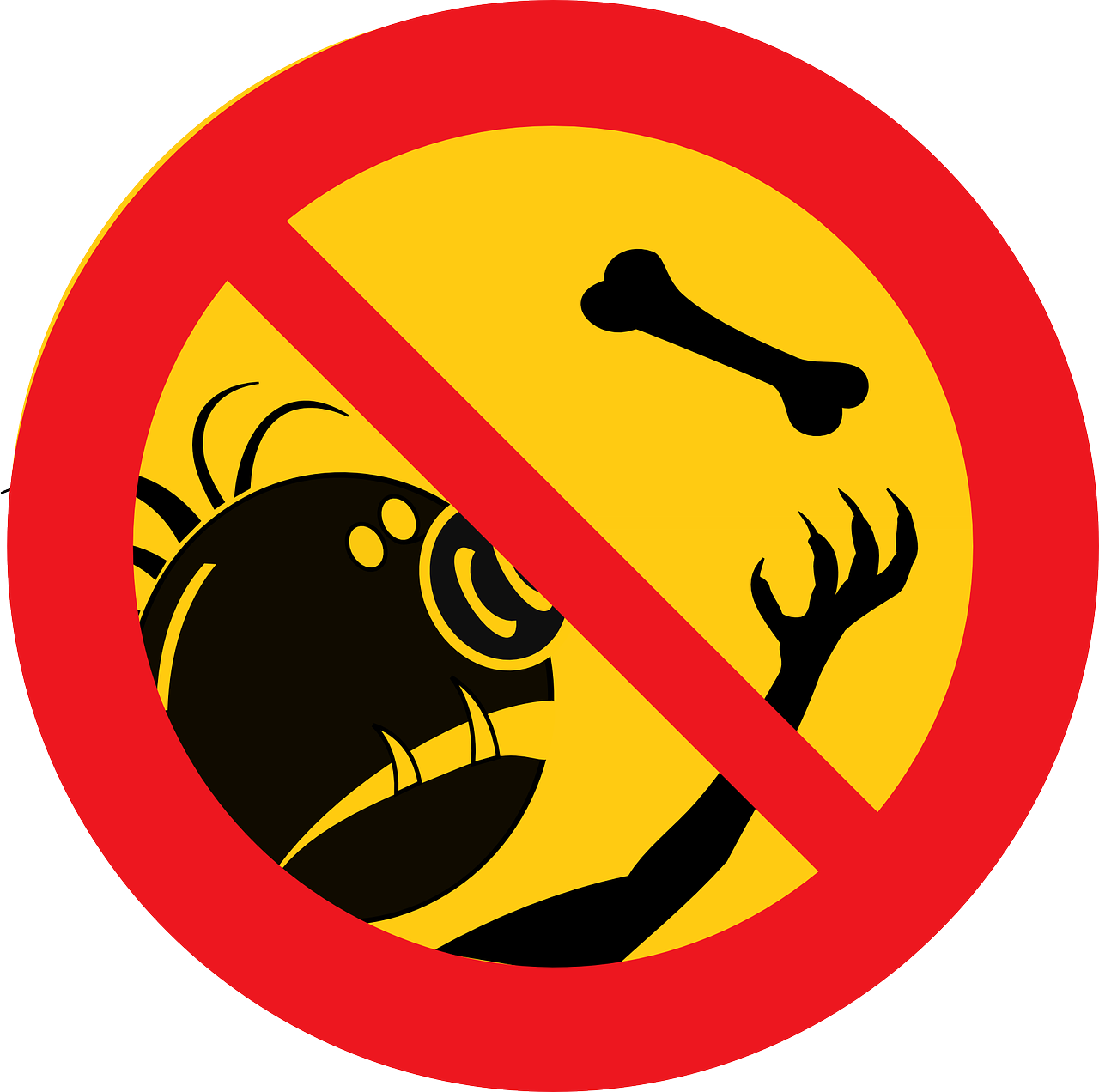
Now the trolls on the other hand can be some crazy scary creatures. Try and avoid them at all costs, and be very wary of provoking any. After any amount of time cruising around our dear world wide web you’re guaranteed to come across a couple. Whether it’s something you’ll read in a forum or on a blog or article that enrages you so badly you act before thinking, or a troll actually infiltrating your own sites for whatever reason, you need to throw away that pointy stick without poking that horrible hairy monster, turn around very quietly and run away. On other sites you’re better off never getting involved with these people – ignore them, and they won’t even know that you were there. On your own sites use your block, ban, and report buttons with gusto in the event of any sort of blow across your bows. I have a few times and that’s been the end of that for me personally, but I have witnessed some pretty awful trollings online that were truly appalling to see, especially on Goodreads. Have no part in these things if you can help it.

When you do get a negative review, pass it on to that part of you who is the business – not the writer – figure out if there is anything to learn from it, in which case it becomes helpful, and if not, move right along and forget about it. Don’t waste your valuable online time on trolls and hurtful reviews.

How much time of every day should you spend “marketing” online, versus how much time should you spend each day writing your next book? Writing your next book must always take priority. A couple of self-published books have gone on to be NYT bestsellers with break out first novels, but that’s not the way this author life generally works. You have to produce more than one book. A little quirk that all of us readers have is the desire to read more from a writer we love. We’ll read a book that we adore, and praise it from the rafters. We’ll look for more books by the same author, and if there aren’t any, we’ll forget about it unless something pops up to remind us about it again. So schedule your daily writing time, and try and stick to it, doing other marketing and business related projects at other times of your day.

If you want to write books and earn a living from it, you are going to have to write and publish more books. If you’re writing a series you probably won’t see substantial sales until you have a couple of books out there. Don’t panic about this though. Underlying anxiety fussing about getting this done could very well knobble your creativity and leave you staring at a blank computer screen. I read an article by Hugh Howey a long time ago, where he said that he didn’t ever bother trying to market his first book until he’d published others. It was only his seventh book, Wool, that rocketed him to fame. I took his advice and I’m glad that I did. As you publish more, you learn so much more than you expect to after that bright eyed ecstasy when hitting the publish button for the very first time. Definitely do market and advertise your first book – of course you must, but don’t let disappointing first sales put you off writing the next or let marketing consume all of your time. You need time to build a readership. Patience and tenacity are what the Indie needs to succeed.
Troll

Image Courtesy: Pixabay

Article excerpt: The Absolute Indie

August 2016 is Write An Amazon Review Month! By @TerryTyler4 #AugustReviews

Hi all:

As some of you might know, apart of contributing to this blog and having my own blog, where I share reviews and other things, I’m also part of another group of reviewers, Rosie’s Book Review Team and one of the other members of the group, Terry Tyler, has had a fabulous idea to encourage people to post reviews. Below is the post! (And don’t forget to check both blogs, especially if you are interested in new books and enjoy reading reviews. And if you’re an author, you can also submit your book to Rosie’s site, here). And if you’re bloggers, don’t forget to spread the word and the love.

Libro

On Monday 25th July, book blogger Rosie Amber wrote this post encouraging readers and writers alike to post a short review on Amazon for any book they’ve read and enjoyed ~ following this up, Terry Tyler is starting this initiative along with other writer-bloggers including Rosie, Cathy from Between The Lines, Barb Taub, Shelley Wilson and Alison Williams.

The idea is that, from August 1st, everyone who reads this uses their Amazon account to post just one review on one book that they’ve read (but feel free to carry on if you get in the swing!).  You don’t even have to have read it recently, it can be any book you’ve read, any time.  The book does not have to have been purchased from Amazon, though if it is you get the ‘Verified Purchase’ tag on it; however, if you download all your books via Kindle Unlimited, as many do these days, they don’t show the VP tag, anyway.

Remember, this isn’t the Times Literary Supplement, it’s Amazon, where ordinary people go to choose their next £1.99 Kindle book.  No one expects you to write a thousand word, in-depth critique; I don’t know about you, but I’m more likely to read one short paragraph or a couple of lines saying what an average reader thought of a book, than a long-winded essay about the pros and cons of the various literary techniques used.  Yes, those are welcome too (!), but no more so than a few words saying “I loved this book, I was up reading it until 3am”, or “I loved Jim and Vivien and the dialogue was so realistic”, or whatever!

Why should you write a review?

They help book buyers make decisions.  Don’t you read the reviews on Trip Advisor before deciding on a hotel, or any site from which you might buy an item for practical use?  Book reviews are no different.

If the book is by a self-published author, or published by an independent press, the writers have to do all their promotion and marketing themselves ~ reviews from the reading public is their one free helping hand.

The amount of reviews on Amazon helps a book’s visibility (allegedly).  If you love a writer’s work and want others to do so, too, this is the best possible way of making this happen.

It’s your good deed for the day, and will only take five minutes!

Off we go, then!  A few more pointers:

If you need any help with writing your review, do click on Rosie’s post, above.

A review can be as short as one word.  The shortest one I have is just two 🙂

You don’t have to put your name to the review, as your Amazon ‘handle’ can be anything you like.

No writer expects all their reviews to be 5* and say the book is the best thing ever written; there is a star rating guide on Rosie’s post.

Would you like to tell the Twittersphere about your review?  If so, tweet the link to it with the hashtag #AugustReviews ~ and thank you!  I will do one blog post a week featuring these links: The #AugustReviews Hall of Fame (thank you, Barb!).

If you have a blog and would like to spread the word about #AugustReviews, please feel free to copy and paste this blog post, provide the link to it, re-blog it, or whatever ~ many thanks, and I hope you will join in to make this idea a success 🙂

Thanks for reading and please, share, like, comment, CLICK and REVIEW! Ah, and remember, share your Amazon review (as we want to make sure people know you don’t need to be a blogger or share your reviews in a blog to write a review!)

Talking about #bookreviews. A collection of great posts on how to get them and how to keep reviewers happy.

Hi all:

Recently I’ve read some great posts about reviews: how to get them, how to avoid things that annoy reviewers, and even posts recommending free books on the subject. You might have read them all, but just in case you haven’t, I thought I’d post them here.

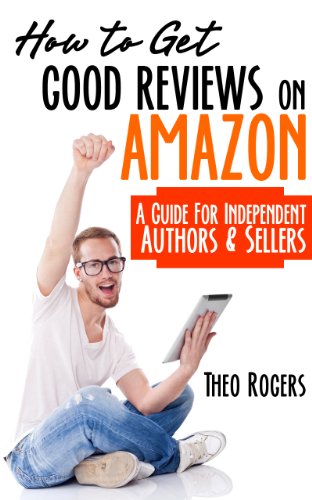
How to Get Good Reviews by Theo Rogers (remember to check the price!)

The first one that came to my attention was a post by Nicholas Rossi, where he mentioned a free book  (this one ) that was still free when I wrote this post but do make sure that’s still the case, and also some updates on other interesting sounding books on similar topics. You can check Nicholas Rossi’s post here. Do follow his blog if you haven’t as he shares a wealth of knowledge and is a great writer.

That post resulted in a comment by Beetley Pete, a great blogger and a top reviewer in Amazon (do check his blog especially if you like dogs, photographs and pretty good writing too. See here, for instance ), where he provided a review on the said book. He made such great points that Nicholas created a post sharing that comment. Check here.

Book and mugsmall

This morning I read a post with the title Top 7 Book Reviewers Complaints in the blog Indies Unlimited. I’ll share the list but you can (and should) read the full post, and contribute to the discussion, here.

According to the post these are the seven top complaints by reviewers:

  1. “…he woke up and it was all a dream.” Done to death and back as a zombie too.
  2. “She could see the insanity creeping into his eyes.” Not the best way to justify a character doing out of character things. (I’m a psychiatrist and this is a particular bugbear of mine.)
  3. “He asked…” “…she answered.” I’m sure there are full volumes on dialogue tags but…
  4. Lack of Dialog (Can result in a lot of telling and not showing)
  5. Too Much Dialog (This is a bit of a personal taste, but it depends on the type of book. The writer of the post likes dialog and so do I)
  6. Too Much Description. Might depend on the genre but…
  7. Too Much Background. Like before

And Others

Don’t forget to check the full article and comment here.

If after all that, or perhaps after doing more reading on it, you still want to approach reviewers, I got a link to The Book Reviewer Yellow Pages here. Good luck! (I have no personal experience of that page but do let us know if you do).

PS: After publishing this post I just read a post by Rosie Amber about writing reviews, the reasons some people don’t and suggestions as to how to go about it, so I had to share it. Check here (and do follow her blog too for great reviews and also for a great way to get reviews if you’re an author).

Thanks all for reading, don’t forget to visit the blogs and follow the bloggers and good luck finding reviewers. And readers remember that reviews are a great way to share your love of books and to support writers!

Olga Núñez Miret

http://www.authortranslatorolga.com


How to Add a Bullet List to Your Kindle Book

Here’s a short tip for you Indie writers this week. With a couple of non-fiction books in the pipeline I spent some time a while ago researching how to put bulleted lists in a Kindle book, but came up with the take home that they are a no-no. I know that use of any type of Word auto formatting in an eBook can cause havoc in the end result. It is possible to create a really good looking bulleted list in my paint software and import it as an image without anyone being the wiser, but it is extra work that I’ve just now discovered doesn’t need to be done. The secret is to avoid the auto formatting.

You could have at a bit of HTML coding if you’re so inclined, as per the example below, but I really am not so inclined right now, so I kept looking. Some people use the Styles menu effectively. I prefer a very clean manuscript for Kindle conversion though, with no hidden bits with the potential to put spanners in the works, so I kept looking.

Bullet List HTML Coding

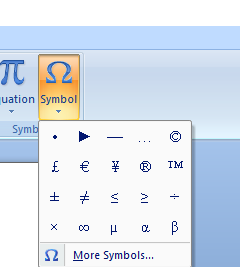
Kindle recognises quite a few of the symbols that you can use with your Insert > Symbol feature if you stick to a common font like Times New Roman – my go to font for Amazon, and one of the symbols to insert is a bullet. All you have to do is insert it before each sentence to be in the bulleted list as you type it out, and no auto formatting will be triggered.

Insert Symbol Menu

That’s not a lot of extra work at all. If going the whole Insert Symbol route before each point seems like a schlep, then just copy the first inserted bullet and paste it in as you go. That way there will be no hidden gremlins to mess up your fabulous book. Happy publishing fellow scribblers.


Planning for the Holidays

Whether you have a new book coming out this year or are just concentrating on marketing your already published backlist, now is actually a great time to ponder your end of year sales campaign. I know that some authors keep at it all the time, but I find that three or four times a year is a good way to give your books a bit of publicity without irritating the daylights out of your followers. It’s also always a good idea to have a comfortable plan in place for the event all ready to go in plenty of time. Get as many goodies in your Christmas bag as you can.

First decide on a budget. It is very, very hard to sell books with a zero advertising budget, but even a little will help. When it comes to presents and bookmarks though, I’ve seen some fabulous homemade ones, so you don’t have to break the bank. Rafflecopters and events with prizes don’t always have to be about Amazon gift cards. You could have something a little more special to win – something related to one of your books or characters. And one thing’s for sure – fans absolutely adore getting something personal from a favourite writer. So – on your holiday campaign to-do list—

Pick your dates.

Allocate a budget if you can, and decide what you’re going to spend it on.

Choose one or a couple of paid book advertising newsletters and pay in advance if you can to avoid price increases. Get a list together of free sites too.

Open a new word document and copy and paste all the links you’re going to need – get your Global Amazon Links there so you don’t have to post separate links for each site, making it easy for readers to use one easy click to buy your book. Shorten your URLs in readiness for your Twitter shoutouts, and get your book covers or artwork all stashed in a file ready to go for the same thing.

Collect some fabulous short excerpts from your book and zoom over to Picmonkey to add them to images that are going to make people want to share.

Set up dates on your list to remind you to go to Amazon and create free days or countdowns for your books. Remember, that as well as your own advertising, Amazon always has a page for countdowns that a lot of readers regularly check.

Set up your swag early. Order or make bookmarks. Get your paperback giveaways ready for posting with personal notes all ready to go. An absolutely fabulous idea is to go to Zazzle and order mugs or just about any other thing on the planet with images of your book covers on them.

Best of all, boost that celebratory excitement by heading over to TSRA Book Trailers and getting yourself an awesome trailer made. These really are attention grabbers, and another wonderful way to find new readers. We all love retweeting cool trailers on Twitter.

I suggest that you do all this well before the actual celebration days begin. There are a lot of people buying books after getting Kindles for Christmas – that’s true, but you’re going to sell a lot of books when people are still in shopping mode too, so try and at least begin before the big bang and let your event zoom through till the end.

Once you have your plan in place you’ll probably find yourself so hugely inspired that you just might not be able to stop yourself from making sure that it’s going to be a brand new book that you’ll be throwing a party for. In that case, get to scribbling scribblers! You’ll find it a lot more fun having everything ready to go in December, rather than having a mad dash at the last minute.

Party

#Author, should you think about translating your book?

Hi all:

As some of you may know, apart from blogging here and in my own blog , I am a writer and I translate books from English to Spanish and from Spanish to English. A few months back and as part of a book fair I was asked to talk about translations and I prepared a few notes. Although the full speech is a bit lengthy for a single post, I thought that in preparation for further interviews with author translating their books (and by the way, any authors who’ve had their books translated to Spanish, I’d be more than happy to share them in my blog after the summer. Just get in touch)  I thought I’d share some of the thoughts I had on possible reasons to get one’s books translated.

Why would anybody want to have their books translated?

  • We all know how big a competition we face to try and sell books. Making it available to a wider audience is always a great idea. In the case of Spanish, it has 518 million speakers across the world, 427 as a native language. It is also one of the six official languages of the United Nations. It is also used as an official language by the European Union, the Organization of American States, and the Union of South American Nations, and by many other international organizations.
  • These new markets are also less crowded. Although the offer in Spanish is increasing, the number of e-books available in Spanish is much smaller than that in English. And of course there are retailers that will be more interested in Spanish books.
  • The same as is the case in English, there are blogs, Facebook pages, reviewers, reporters, critics, writers and readers looking for books in Spanish. I can say that with regards to other writers, I’ve found it easier to get in contact with writers who are best-selling authors, even across the whole of Amazon, in the Spanish language, than it is getting to know the big sellers in English. (Of course, some markets like Amazon Spain or Mexico are smaller, but still…)
  • One never knows when chance of pure luck might strike. I know a Spanish writer called Enrique Laso, whose books have been translated to many languages and who told me that although he has no idea why, his books translated to Greek have been great hits there. It’s impossible to know what might strike a chord with readers in a particular market.
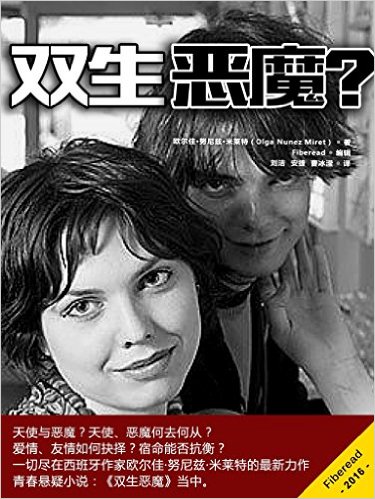
  • I’ve read many posts by writers talking about how exciting it is to see your first book published and, in the case of paperback, have it in your hands. Well, I must confess seeing one of my books translated to Chinese made me feel equally excited. (Although you won’t be able to buy it in Amazon.Chn is also available in Amazon.com…) And I had to share it here.

    Twin Evils? Chinese cover. Of course it's also available in English and in Spanish as 'Gemela Maldad'
    Twin Evils? Chinese cover. Of course it’s also available in English and in Spanish as ‘Gemela Maldad’
  • I know of authors who are working on the idea of publishing their books in bilingual editions and indeed they might provide a good option for marketing as an aid to language learning.

Thanks to you all for reading, and if you’ve enjoyed the post, I might share some more bits of the full original, and please, share, like, comment and CLICK! 

Olga Núñez Miret

http://www.authortranslatorolga.com

Beta Readers

Not all writers use beta readers, and not all writers offer their services as beta readers, but both of these things can serve as a huge help in our writing. Looking at it from the writer’s side first, it’s important to know what it is that you’d like your beta reader to do for your story, if there is anything in particular that you do want. Don’t be shy to ask if you suspect a weakness in any area.

In general, as well as glaring plot holes and so on, your beta reader will spot things like continuity problems, or hair that started out blonde and suddenly changed to auburn half way through the story. These are big deal issues for your future readers and often things that we miss because of our closeness to the story. For the same reason, we may leave out crucial descriptive passages or backstory because we know what’s going on. Beta readers could help you find typos and grammar gremlins too if that’s what you want and they’re so inclined.

When looking for beta readers, firstly look for those who enjoy reading the type of book you’ve written. A sparkly vampire book will probably not appeal to someone who thinks that Dostoevsky is the greatest thing since cream cheese. Be wary of those who are blatantly overcritical online. Some people just enjoy finding fault, and that’s not who you’re going for. Other writers generally make the best beta readers, because they know how to write, and mostly they’re kind too.

Be grateful for the service they’re offering you. Beta reading requires more than just reading a book, and all writers are busy bunnies, so giving you their precious time is a favour indeed – try and return it if you can, but even if you don’t, always appreciate it.

Don’t take all input to heart. Any critique can cut like a knife, but really make sure that you never, ever react to any of it with aggression. By the same token, you don’t have to agree with it, or implement any changes suggested if you don’t think that they fit your story or your particular writing style.

When you are the beta reader, on the other hand, always try and remain neutral when it comes to any of your personal pet peeves. We all have them, and they are most certainly not universal. Some people find particular words offensive. Others demand that NO telling at all be allowed in any tale – it must all be show, and show only.

Be kind. There are ways of critiquing that don’t have to include things like, “Your entire third chapter is a load of codswallop – delete it all!” Even if you do spot glaring and tragic errors and writing that grates on your very bones, be polite when returning your comments, while still remaining truthful.

In the end, remember that when it comes to the flesh of your story, and also your unique writer’s voice, you do not have to change any of it. Be open though, to the advice of those who don’t have a vested interest in your scribbles, and just take a deep breath or twenty, and try and take it for what it is – help.

Reading

Image Courtesy: Pixabay

Pretty Paragraphs – Inserting Drop Caps

The best place to look for information on how to publish your book for paper with CreateSpace is actually in your collection of traditionally published fiction and non-fiction. In their eBook, Building Your Book for Kindle, Amazon suggests both indenting the first sentence of paragraphs and also inserting empty space between paragraphs. A lot of Indies, myself included, made the mistake of using the same system for our paper books.

It’s not the end of the world, and doesn’t look terrible, but the way it’s usually done is either using indents with no spaces between paragraphs – apart from the first paragraphs of every chapter, which are not indented, or having the spaces between, but not indenting any of the paragraphs. Amazon recommend paragraph indents of 0.5” in Kindle books, and again, a lot of us carried that figure over when we formatted for our paper books. It also doesn’t look terrible, and most readers probably won’t notice, but if you look again at your fiction collection, you’ll see that they mostly use smaller paragraph indents. To set yours, click on the little arrow to the right of the Paragraph box, and adjust the settings for both the indentation and the spacing there. Remember to select the portion of your book where you want this to happen accordingly.

Indent and Spacing
You might also fancy having a drop cap in the first paragraph of every chapter. All you do in Word is highlight the paragraph and click on Insert, then select Drop Cap and choose the style you want.

Drop Cap 2

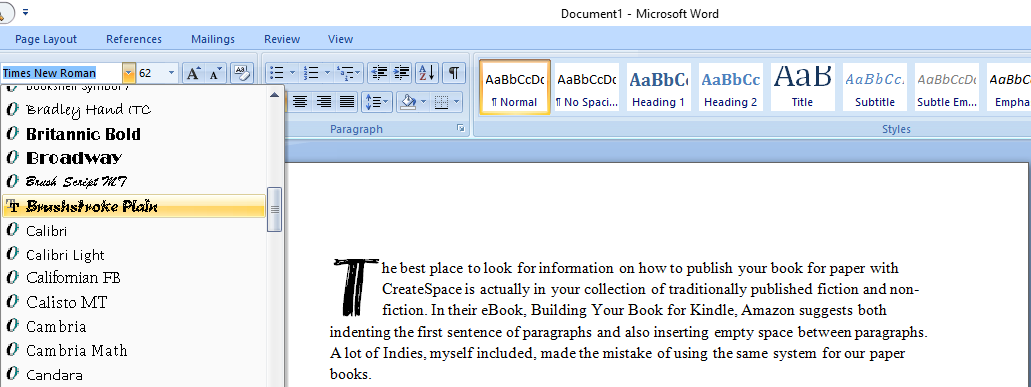
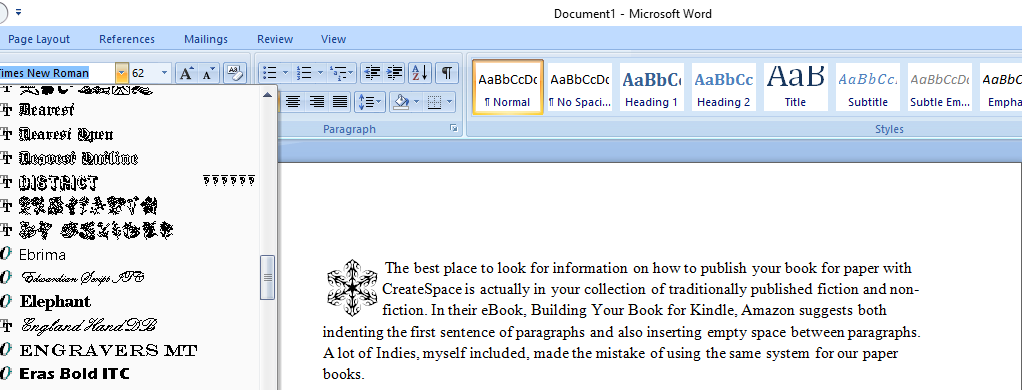
If you want to use a different font to the text for your drop cap, highlight only the first letter and select Drop Cap. Go back to your Home ribbon and open the font box. As you move down and hover over selections, you’ll see the end result appear on the page.

Drop Cap 3

If you’re looking for free and paid for new fonts, head over to Font Squirrel and download away. Always be very sure to read the licence terms for any free font, as some require attribution. Most of these fonts will embed nicely in your PDF file for uploading to CreateSpace, and if they don’t, just don’t use them. All of the standard fonts that come with Word will work great. You could also use Wingdings or other font illustrations as a drop cap with a space after it and begin the paragraph normally.

Drop Cap 4

How to Create Lines for Interactive Books

I’m working on a couple of projects that require lined pages for interactive paper books for CreateSpace publishing. Note that I’m not suggesting this method for Kindle books, mainly because I haven’t tried it there yet, and fancy formatting is not a good idea at all for Mobi, but also because a lined eBook isn’t going to do anyone much good. For eBook workbooks, I’d suggest rather including a printable, downloadable PDF workbook in your Kindle book—but we’ll do that another time.

If you want to create a journal or workbook, you’re going to want lined pages, or pages with text, images, and also lines. You could probably just hit the underscore a whole lot of times but that could run into problems, and using Word’s formatting tricks works well with CreateSpace. This way you control the look of your pages very nicely. Here we go.

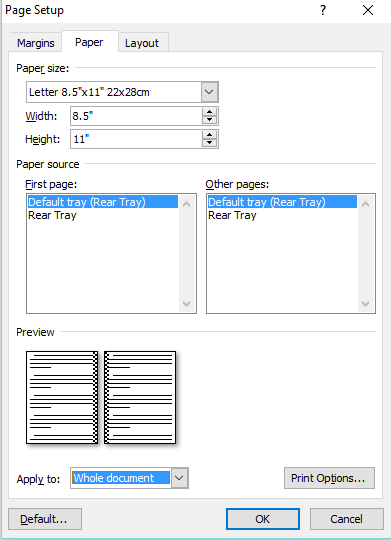
The first thing to do is to set up your paper size.

1Paper Size

And margins.

1Margins

I’m using a large size here, 8.5 x 11 inches, but obviously you would set your own book size and margins accordingly. The next step is to decide how long you want your lines to be. If you want them the width of the page, then simply subtract your gutter, left and right margin sizes from the width of the book. Once you have your book size, it’s easy to decide on the length of line you want—play around with it awhile before saving.

Next, place your cursor where you want your first line to appear, and toggle the Show/Hide (pilcrow) function on. Highlight the pilcrow that appears on the page. Click on the arrow beneath the Change Styles box and select Clear all, to clear the formatting on it.

1Clear Paragraph Formatting

Click on the arrow in the Paragraph box from your home tab, and then click on the Tab box at the bottom of the box that pops up. In the Tab stop position box, type in the number that you get after deducting your margins. Select Right alignment, and select 4 in the Leader box (this is for underline). Click Set and OK.

1Set Tab

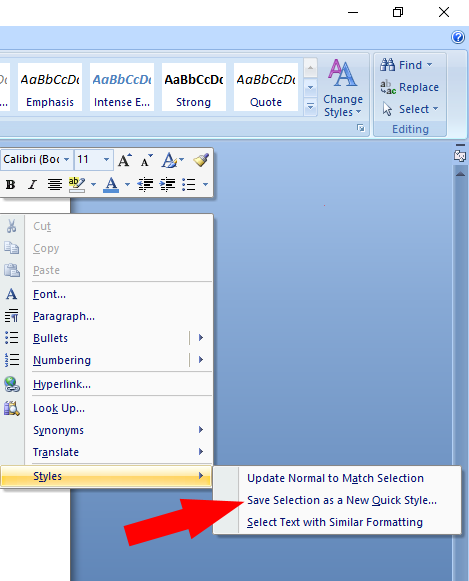
Now go back to your pilcrow and hit the tab key. Your line will now zoom across the page. Right click on the pilcrow and select Save Selection as New Quick Style.

1Save Style

Type in the name of your choice and click OK. To use the lines in this manuscript now, all you have to do is select it from the Change Styles box, and click Tab and Enter.

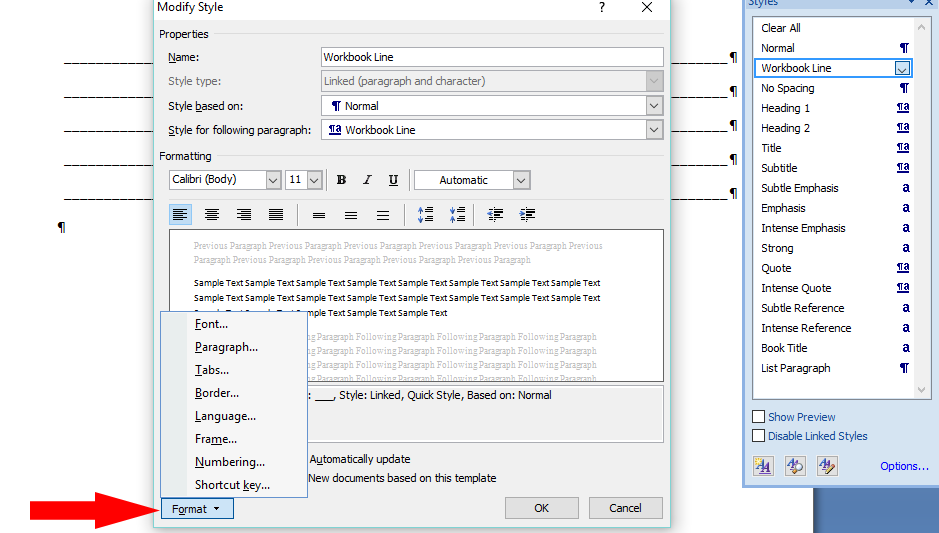
To format your lines, open the Change Styles box and click on the little arrow that appears when you hold your cursor over your newly created style. Select Modify and then Format, and then change the Paragraph line spacing as you wish.

1Format Line

1Format Spacing
Right click on the pilcrow to change the line colour. Unclick the Show/Hide pilcrow to get back to working normally.

Remember that if you change your margins at a later time, you will have to format your lines again, but for this particular book, you’re ready to go, and don’t have to abuse the underscore key or get your head around tables.

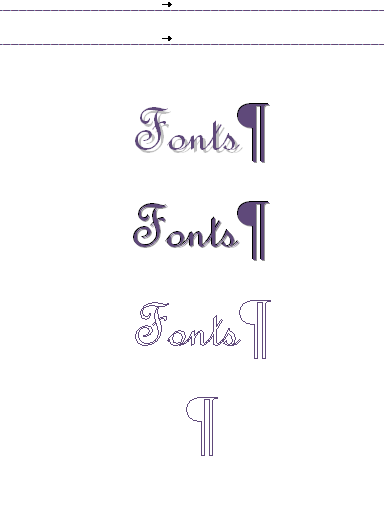
Lastly, while we’re on the subject of journals and workbooks, you might want to explore your font horizons on Word for some really pretty or striking effects. Click on the arrow in the Font box from your home page and play around with all the effects and options available for each font. Happy creating fellow scribblers.

1Font2

1f2

Never Use Tabs in Manuscripts for Kindle

When submitting manuscripts to traditional publishers, you are generally required to number your pages—apart from the title page—and to indent first lines of paragraphs, as well as various other specific to guidelines formatting related things. With this knowledge instilled, a lot of writers will set these things in place when they start writing a new book to save time later. If they’ve never formatted books for Amazon and CreateSpace before, they’re not going to be aware of how tricky it can be to remove these things. Even if you’re planning on outsourcing your formatting, it’s a much better idea to avoid any possible mistakes.

Tabs anywhere on a manuscript for Kindle can cause all sorts of really terrible issues with your published book. It’s a much better idea to stick with only the basic formatting required when you type your book on your computer. For a newbie at formatting for CreateSpace, you could end up pulling out large clumps of your hair trying to get your already numbered pages to start in the right spot, so rather than fight with all these things later, when you’re already at explosion level in the excitement of imminently getting your finished masterpiece to the eyeballs of readers, don’t use any bells and whistles at all.

Indent

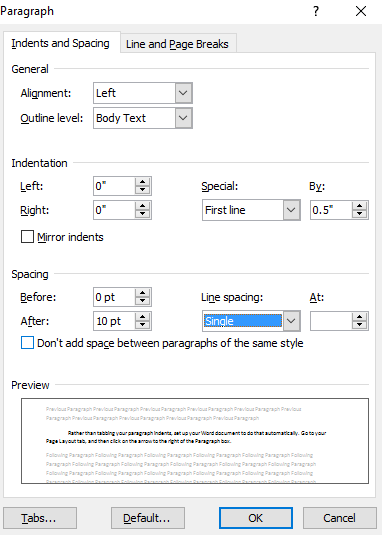
Rather than tabbing your paragraph indents, set up your Word document to do that automatically. Either do this before you begin typing, or Select the whole document first. Go to your Page Layout tab, and then click on the arrow to the right of the Paragraph box. Under Special, select First Line, and then choose how many spaces you want to leave on the first line of each paragraph. Under Line Spacing, select Single, and click OK.

As well as first line indenting, don’t use tabs anywhere else in your manuscript either. Tabs are totally out for Kindle. Only your paper book gets page numbers, so don’t bother about that at all until just before you’re ready to publish. If you’ve already got a manuscript with these things in place, make very sure to remove every single one of them before trying to load your book up to Amazon, either by using the Show/Hide (pilcrow) feature in Word, or going for the blitz method by clicking on the arrow in the Change Styles box and selecting Clear All. This will take out every little bit of hidden formatting, and you’ll have to start from scratch, but at least it’s one way you can be sure to get rid of anything that could make a mess of your published book.

If you’re planning on submitting to publishers, rather make a copy of your manuscript when it’s complete, and add all of the agent/publisher required formatting to that, keeping your original totally clean, in case you decide to go Indie with it at any point.


Inserting Links in Word for Kindle

You can add links to various websites, your books, your table of contents to your eBooks, as well as links within your book to a glossary or section of interest. Once you’re finished with your editing and basic formatting you can start to add your links.

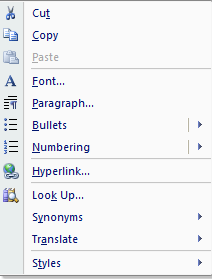
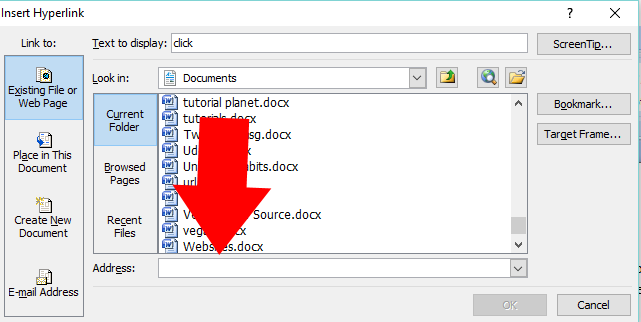
To add a clickable link to your website or books, go to the site or the product page of your book, and right click and save the URL. You then go to the relevant word or words that you want to add the link to. Highlight them—for instance, the title of your book, then right click on what you’ve highlighted. In the box that appears, click on Hyperlink.

H1Paste the URL into the Address box and click OK, and it’s done.

H2

We’ve already shared how to use the hyperlink functions on Word to create the required NCX Table of Contents for Amazon, so the final bit of linking advice would be for within the body of your book.

To do this, first create a bookmark by highlighting the source word or phrase that you want to link to another section in your book. Go to the Insert tab, and click on the Bookmark icon.

H3
Write the name of the bookmark in the required field, using only lower case lettering and numbers with no spaces in between. Click OK.

H4
Then go to the destination text and do the same thing with the bookmark name for that.

H5
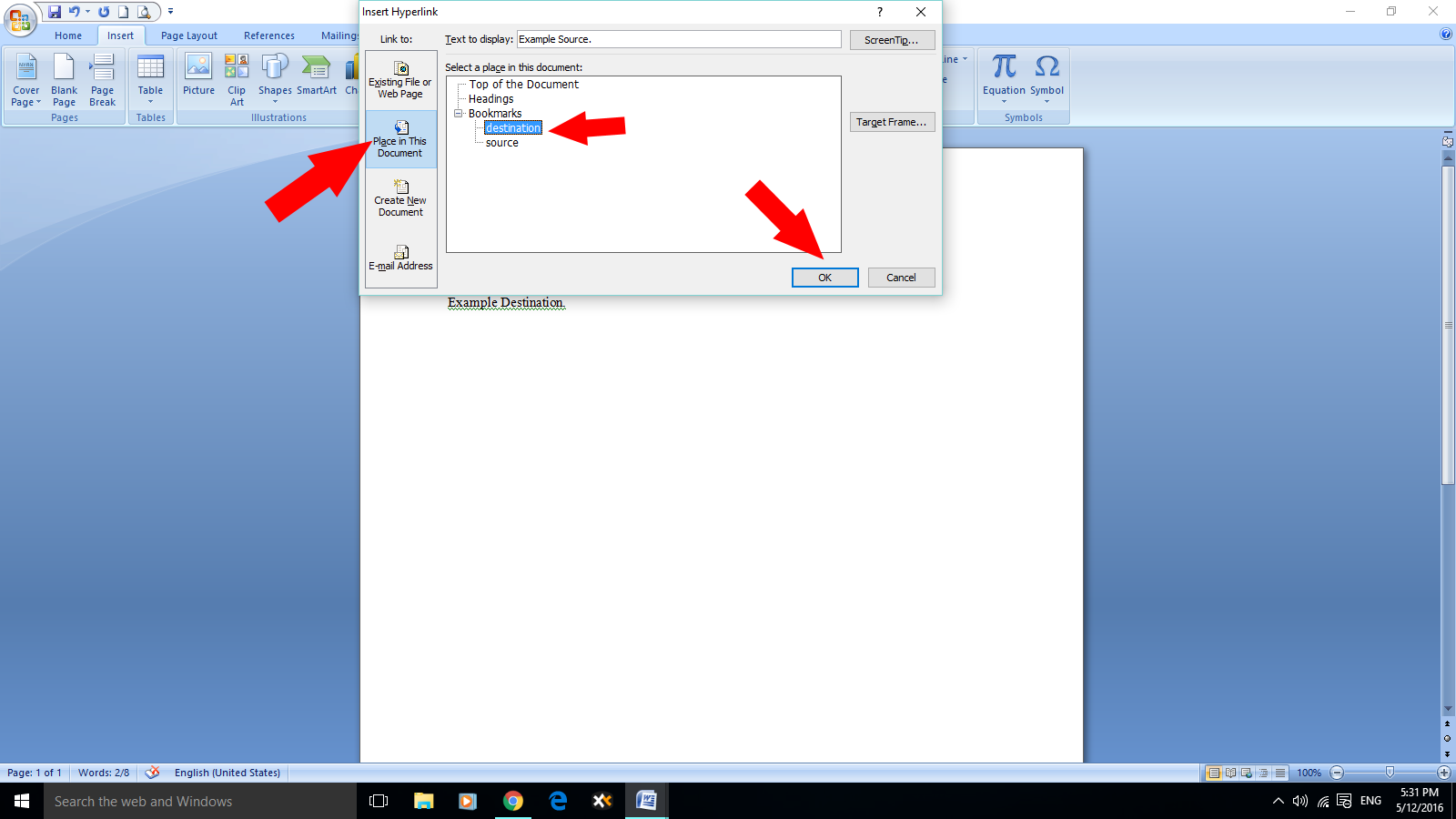
Highlight your source word/s and from the same tab select Hyperlink.

H6
Select Place In This Document and select the destination bookmark. Click OK.

Finally repeat the process from the destination to the source, and there you have it.

Go Back and Show Don’t Tell

Something I noticed rereading the first book that I wrote, and often also notice in the first books of other scribblers, is that we should probably sometimes rewrite the first quarter of our first book. We often overwork those very first chapters to death in our newbie angst to get it all in there. There’s that fabulous moment when you realise that you’re actually going to write a book. Your eyes widen, and a whole flotilla of butterflies do an exciting rendition of the Macarena right beneath your solar plexus.

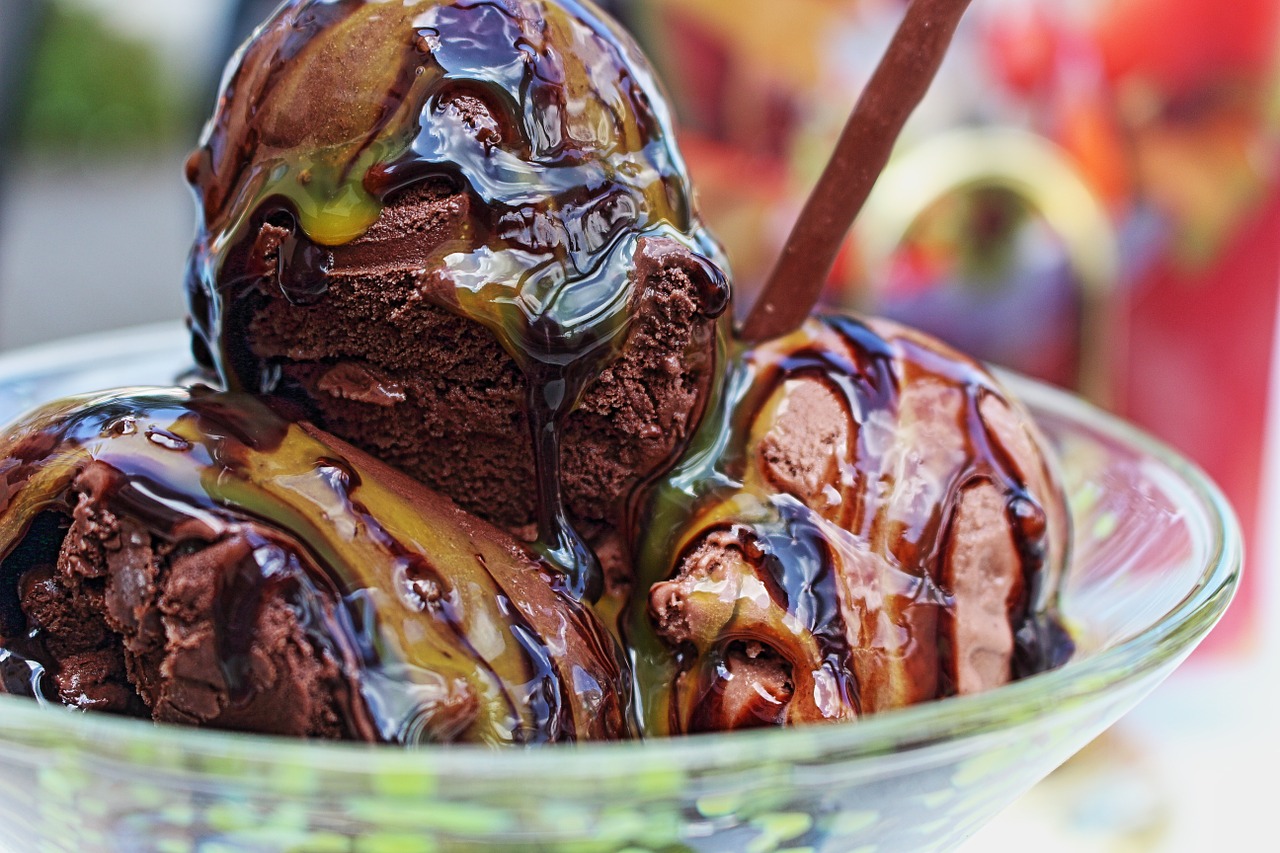
Then you get stuck in, and those first pages flow right out, and you do happy dances, and refuse to bath or cook dinner. Because this is suddenly real. Real writers don’t need to get wet all the time, and neither do they need to eat to live. You’re a WRITER. That’s all you need. Well. That first joy is indeed something that should not be forgotten, but unfortunately it is, right about when you start to believe that unless you let your readers know, without any shadow of doubt, that your heroine has blue eyes, blonde hair, is just an inch short of six feet tall, and is about to ingest a large quantity of chocolate ice-cream—unless you tell them ALL of that, they’re going to lose interest and think you’re a rotten writer.

So off we go with the newbie telling. As in: Sheona felt the warm air of the summer January day in nineteen eighty four, blow through her blonde her, while she turned and walked towards the door before opening it, and turning left to go to the kitchen, where she turned her almost six foot tall frame to the right so that she could—aaargh!

Fair enough. That is a particularly nasty example of telling rather than showing, but I doubt that there are many new writers who get it all right first time. It’s very common to read books that get off to really hiccoughy starts, but then suddenly you can see the author hit his stride, and the words flow a story through your mind, rather than make you feel that you’re looking at a list of activities. Why not go back and have a little look at your first scribbles while between books?

After you have a couple of published books under your belt, probably the last thing that you want to do is go and fiddle with the very first one that let loose on the world. You want to be forging ahead with new books, not wallowing in history. The thing is though, as you get more readers with your new books, many of them are going to like your stories well enough to look for more from you, and so you’ll find that directly after reading your latest, most polished book, in the throes of proper fanly adoration, they will zoom over to Amazon and see if you have any more for sale. They won’t check publication dates, and being readers and not writers, they probably won’t be as forgiving with newbie writing in the first bit of your first book.

So, as your backlist grows, consider heading back and giving some of your first work a bit of a polish for new readers, with your new knowledge and experience. As Indies this is indeed a wonderful bonus. You get to change anything you like, anytime you like.

ice-cream-sundae-761415_1280

Image Courtesy Pixabay


A new #tool to promote (your posts, tweets, videos) Co-Promote

Thanks to Unspalsh for another great image

Hi all:

A quick post just to make you aware of a new tool an author shared in one the Facebook groups I belong to.

It’s called CoPromote and you can find it here.

I haven’t been using it very long, so I’m learning as I go along, but I thought you might find it interesting. You can sign with Twitter, Facebook…. (the usual suspects). Once you’ve signed, the site gives  you the opportunity to promote (boost they call it) one of your Tweets, Tumblr posts or one of your videos in You Tube or Vine (or the four of them). You’ll have to connect your accounts in those platforms, if you have them, but then if you choose to boost a Tweet, for instance, the site brings up your Twitter feed and you can choose one of them. How it works is, you boost one of your posts (you have to tag it according to theme) and then they’ll suggest posts that you can share based on your interests, that you can record (you can edit those if you aren’t offered much choice. The wider you cast the net, the most posts you’ll be offered to retweet, reblog or feature, in the case of videso). The more posts you share for others (and you will be given a list and you can decide to share each one or not) the more others will share yours. The site tells what reach your content has achieved.

I’ve so far only tried the free option, that is limited in the reach you can achieve (although it seems to grow with time) and number of posts you can boost, but there are paid options that offer you a bigger reach and also options to boost several posts. (The free option only allows to boost a post in each platform at a time and they normally last for a certain length of time, that varies, longer for videos and shorter for others. If you connect your e-mail they’ll tell you when the campaign has finished, but it’s worth keeping an eye on it, just in case, as it doesn’t always happen. I’ve also noticed that there’s the option of terminating a boost before it’s run the time allocated).

If you enjoy the content of some of the people in particular, you can follow them there and their content then will come up automatically when you’re looking for things to share.

If you want to check their own video explaining how it works, here it is:

Although I haven’t been using it long, it seems like an interesting option to reach different people and to meet new bloggers, You Tubers and Tweeps. And as one can choose what subjects to boost, it also can be used to discover new content, that you either write about (therefore reaching people already interested in it) or you want to research.

Go on, give it a go!

Thanks for reading and you know what to do, share, comment, like…

Olga Núñez Miret

@OlgaNM7

http://www.authortranslatorolga.com

http://www.OlgaNM.com

A Closer Look at Creative Commons Licensing

publicdomain.large

We’ve spoken about copyright before on here on LWI, but a lot of scribblers are still unaware of some of the pitfalls out there, especially when it comes to the Creative Commons (CC) licenses. As I’ve often said, when it comes to copyright infringement for both content and images, it is always better to err on the side of caution.  Unless you’re a hundred percent certain that using someone else’s work can’t possibly get you sued, don’t use it.  When it comes to this issue, ignorance of the law doesn’t count.  You are always at fault even if you don’t know what copyright means, and as such, if you’re sued you’re more than likely going to have to pay up.

While titles of books are not subject to copyright, and you can use them as you please, the content of books and also songs are very much so, unless they are clearly in the public domain.  Stay well away from music.  Never use song lyrics in your books without specific written permission from the copyright holders, unless you are positive that they are in the public domain – not even a single recognisable sentence.  It’s not worth the risk.  Legally, using a phrase of ten words or less is considered fair use if you’re happy to take the chance.  Plain lists can’t be copyrighted.  For instance, a list of varieties of birds.  Recipes can’t be copyrighted either.  Unless you actually do very obviously copy and paste another writer’s recipes right down to the same words for the method. Another point to consider is that there are many images that get loaded and labelled as CC0 that are in fact not owned by the people who have loaded them. Another biggie is when using images of people. Unless you have a model release please don’t ever use free images of people for your commercial work. Free fonts downloaded onto your computer also have licences, so be sure of any limitations before you use them in your books.

Anything with a CC licence isn’t automatically free to use in any way you choose and for any purpose, so it’s always a good idea to check properly first. You’re generally safe with public domain works, although you should take note of the fact that just because something like the Mona Lisa is in the public domain and if you take a photo of it, you can indeed do anything you want to with it, photos by other photographers are subject to copyright unless they licence their images CC0. So let’s have a look at the CC licences.

Creative Commons Zero (CC0) works are purposely given this licence particularly because their authors/artists want them to be as freely available worldwide for any use by anyone. You can change them, paint moustaches on them, or use them for your commercial and non-commercial work just as you like, with the only potential problems being when they contain images of people or copyrighted places.

CC BY

Attribution

You can distribute, remix, tweak, and build upon this work, even commercially, as long as you credit the artist/author for the original creation. So in this instance all you would have to do for use in or on your book would be to place the credit in the front matter. This would apply even if the work used is only a small element of a bigger work created by yourself.

CC BY-ND

Attribution-NoDerivs

You can redistribute for both commercial and non-commercial work, as long as it is passed along unchanged and in whole, with credit to the author/artist/creator. Once again, credit in your front matter, but with the added proviso that it can only be used exactly as it is. No changes at all including the use of only a portion of it.

CC BY-NC-SA

Attribution-NonCommercial-ShareAlike

You can remix, tweak, and build on it non-commercially with credit to the creator, and the proviso that you licence your new creation under the identical terms. This is not going to do for your book, unless your book is permanently free, and even then I would think that you would be able to find something else suitable with a CC0 licence. For just playing around to publish on your blog, this would be fine—just don’t forget the credit.

CC BY-SA

Attribution-ShareAlike

You can remix, tweak, and build upon once again but also for commercial purposes with credit to the creator and identical licensing terms. This means that your new work using this would also have to bear the CC BY-SA licence online. You would have to REALLY want to use this for your book to go to so much trouble.

CC BY-NC

Attribution-NonCommercial

You can remix, tweak, and build upon non-commercially with credit to the creator, but you don’t have to licence your new work on the same terms.

CC BY-NC-ND

Attribution-NonCommercial-NoDerivs

You can download and share with others with credit to the creator, but you are not allowed to change them in any way or use them commercially.

So it’s good to remember that when a font, image, or article is labelled Creative Commons, especially on Wikipedia, it’s always important to look at the exact CC license it’s using before using it for your commercial project. There are many great sites, such as Pixabay and Fontsquirrel where you can download freebies to help you on your way to published awesomeness so there is no need to upload straight from Google searches. Still, it’s always best to check before using anyway.