Publishing Your First Book on Amazon for New Indies by @JoRobinson176

It’s a good idea to find out how to publish your first eBook on Amazon before, or while you’re writing it. Simplicity is the key, and if you have too many bells and whistles going on formatting wise, you might end up having to clear all formatting and start from scratch. If you use a word processor other than Microsoft Word you might have to pay for formatting, but using Word makes the process very easy. Here’s a quick overview for a standard work of fiction without images. (Click on the screenshots to view them larger)

Don’t use lots of spaces or your tab key for indents. This could result in an ebook that’s a bit of an oops. Rather set up the whole document. You can do this from your first paragraph, or you can highlight the whole document and set it up. Do this from a clean document only after you’ve removed any indents, spaces and so on. Use the Show Hide feature to check.
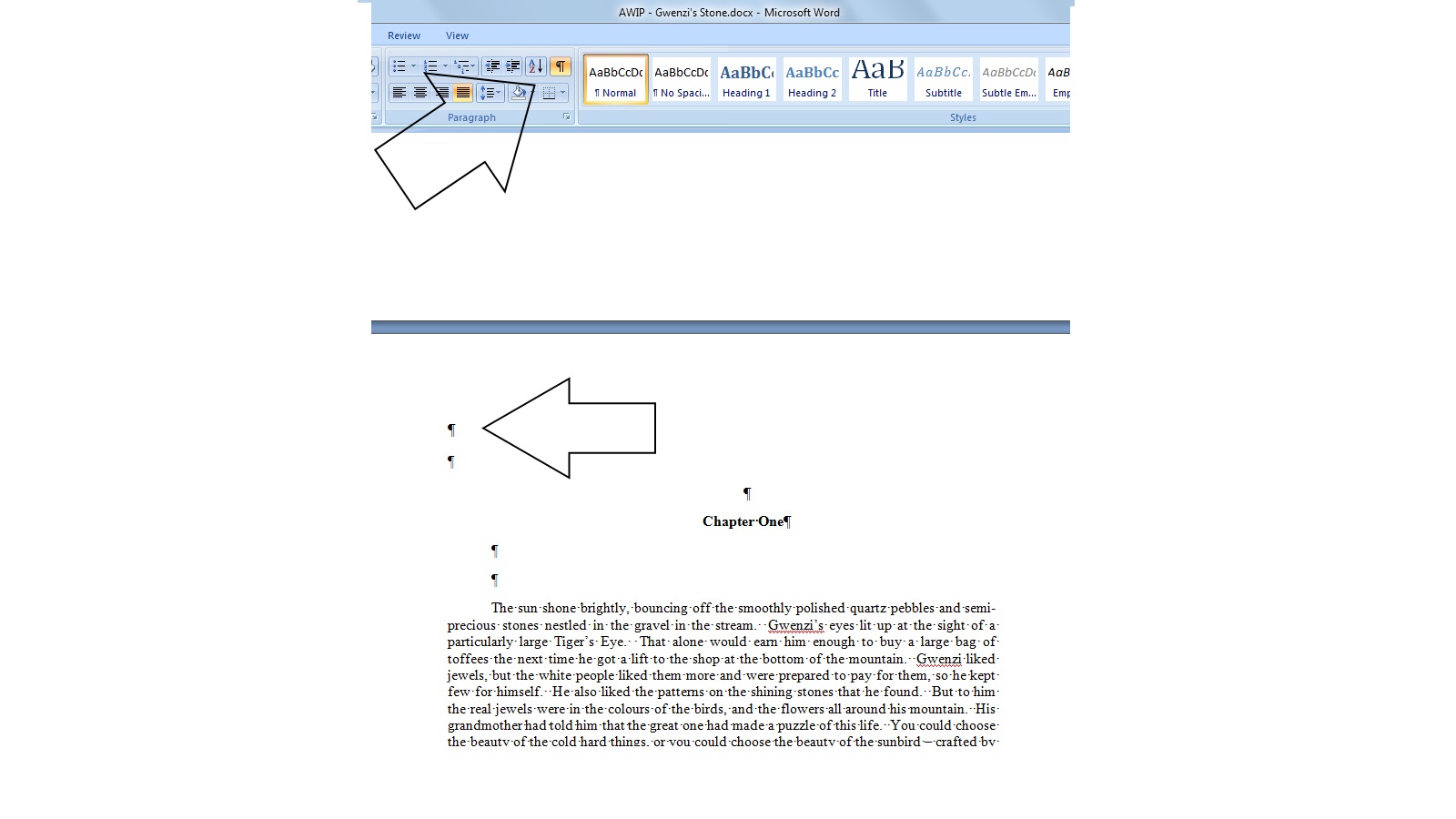
p Show Hide

Go to your Page Layout tab in the top ribbon of your document, and then click on the little arrow to the right of the Paragraph selection. Select Indents and Spacing and change Special to First Line, and then change By to your preferred size of paragraph indent, and that will do your indents automatically for the entire manuscript from then on.

p Paragraph Settings

Then, in the same box, set your automatic spacing between paragraphs, so set your Spacing to your desired size, and set line spacing to Single.

p Paragraph Settings 2

While writing, insert Page Breaks before each chapter and don’t use headers and footers. Also no page numbers for your eBook. Kindle only uses seven basic fonts, and readers can change them according to their preference. They can also change the font size, so 12pt is probably the easiest size to choose. It’s best to use a simple font like Times New Roman or Garamond, but that’s entirely up to you.

Then you decide if you want a table of contents for your book. If you do, from your Home ribbon, highlight your first chapter heading, and then click Heading 1. You can right click on the Heading 1 box to Modify Font, Size, and Justification for your chapter headings. Once you’ve modified to what you prefer, right click on the Heading 1 box again and click on Update Heading 1 to Match Selection. Then zoom through your book and highlight each chapter heading, click on Heading 1, and they’ll all be the same.
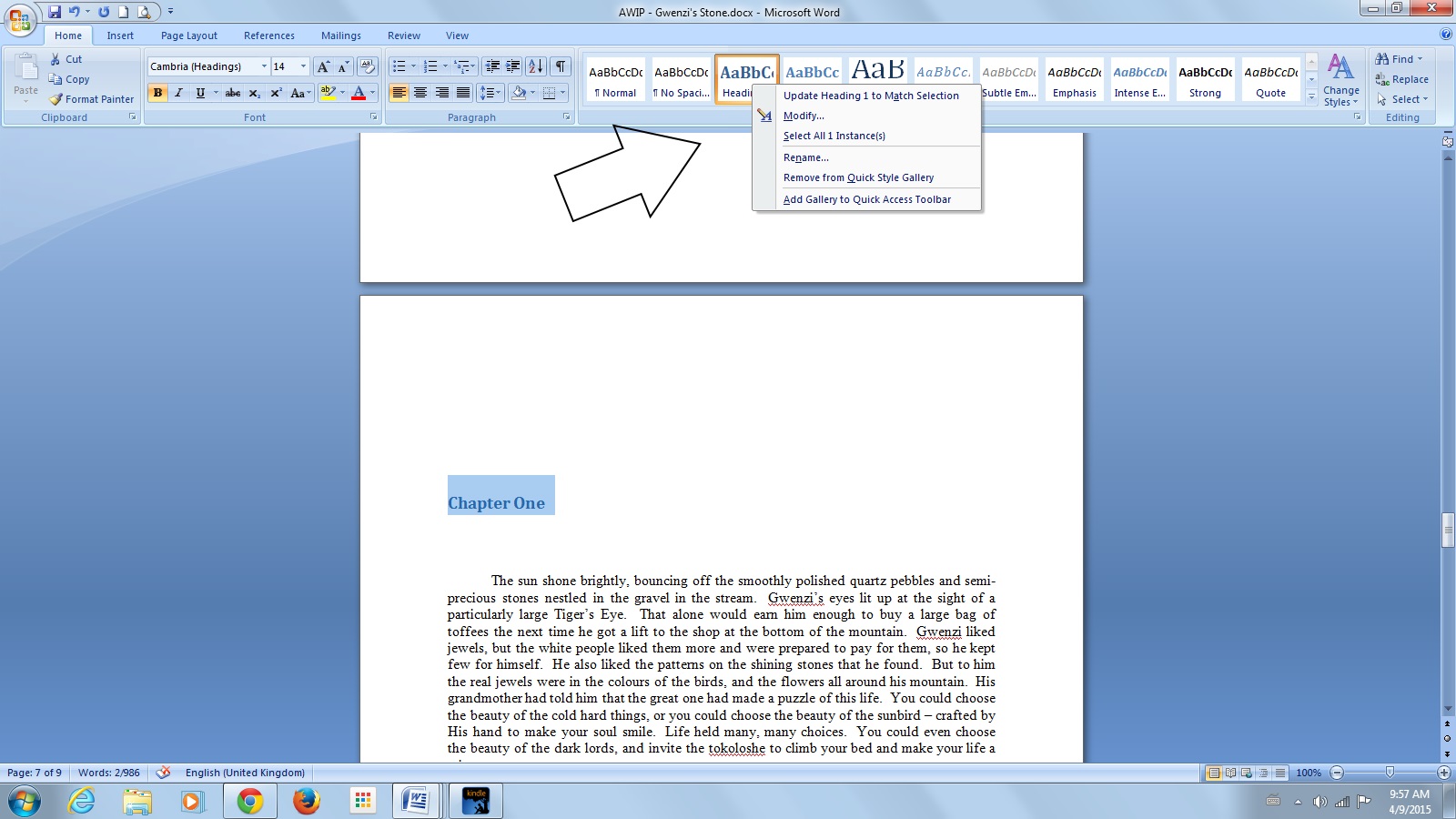
p TOC

Once you’ve done that head back to the front of your book where you’ll need a blank page. Type the words Table of Contents using left alignment, and press enter. Click on the References tab in your top ribbon, then Table of Contents > Insert Table of Contents. Uncheck Show Page Numbers, and set the Show Levels box to 1. Click OK, and voila! Your Table of Contents will magically appear. To test it, use Control > click over one of the chapters in your TOC and it should take you there.

p TOC 1

Now to bookmark this. Highlight only the words Table of Contents. Select Bookmark from the insert tab on your top ribbon. Type in toc and click Add in the box that pops open, and you’re done with the fiddly stuff.

p TOC 2

Assuming you’re done with your final proofing and edits, go over your manuscript, and check that your front matter is looking good. Insert page breaks between your title page, copyright page, and any other things you have there, such as a forward, prologue, dedication, or editorial reviews. One thing I haven’t done yet in all my eBooks is add a description in the front, although I’m going to. These days we have so many books on our Kindles that we forget what they were about, so a little blurb there is a nice idea.

Then check that all your links to your website or any other books are clickable, finally Save this document, and prepare for takeoff. After saving all your hard work, go to the Save As function in the top left corner and select Other Formats. Next, under the File Name select Web Page, Filtered in the Save As Type box. Click yes when the warning comes up. You’ll see that you now have your original document, and also a HTML document of the same name. The HTML is what you’ll be loading on to Amazon. (If you have images in your book, you will need to load a compressed file onto Amazon, so this is only for manuscripts without them)

p HTML

Have your cover ready separately as a jpeg or tiff image. I use nice quality high resolution images sized at 6.25 x 9.5. You’re ready to rock.

If you haven’t already, open your account at Amazon KDP, and fill everything in. If you don’t live in the USA you have a couple of tax options, including allowing Amazon to withhold tax until you get around to getting to the proper processes. You can still publish and earn royalties until you do, and any withheld taxes will be paid to you when the necessaries are done.

Go to your Bookshelf. Click on Add New Titles, and take your time filling in all the fields. Especially don’t rush through the Categories and Tags. These are important for your book’s visibility. Select your Royalty. This can change for each book you publish. Books $2.99 and up get 70%, and below that get 35%. Put your book blurb in Description, add yourself as the author in Contributors (and any other contributors that should be there), state your right to Copyright and not Public Domain, and now it’s time to upload.

Your book file and cover file get loaded separately, both very simple processes – you just upload straight from your computer, and wait to be told that each upload is successful. Click on Upload Book, browse, and select the HTML document to upload. As soon as you see Upload and Conversion Successful, you get various options to review. I always download the Mobi file to go through on my Kindle for PC, and also to check on my actual Kindle, as well as paging through the online reviewer. Once you’re happy, click Save and Publish. Your book will then be live on Amazon within the next 48 hours. Set up your Amazon Central page, and find and claim your book.

When you write your next book, you can make a copy of the formatted one, delete the words and retain the formatting, which is a thing that scribblers as forgetful as I am might find useful. Happy publishing Indies.

UPDATE: SEE OUR LATEST ON HOW TO Create NCX Table of Contents using Calibre
Proofreading When the Writing’s Done by @JoRobinson176

One of the biggest things I learned on my Indie trip was that I couldn’t see my own mistakes. I must have proofread my first manuscript dozens and dozens of times, and I was very confident that it was pristine. Then I went on to editing and made some changes to paragraphs, swopped words around, and thought that that was that. I had put many hours into the polishing, and was feeling all warm and fuzzy that I’d done the work well when I hit that publish button. How very, very wrong I was. There were still typos and grammar gremlins in the book after all of that hard graft, primarily in the changes I’d made, and I came down to Earth with a bang in a blaze of shame, realising that that the editing was not at all complete when I thought it was.

I learned that if you write something and proofread it yourself, your brain knows what word is coming next, so it often sees a typo as it should be, even though a typo in another writer’s work will stop you in your tracks, seeing your own isn’t so easy. These days I’m much more careful, and I make sure that eyeballs other than my own go over my stories before they’re published. Typos still can slip through, but luckily with Indie publishing they can be very quickly fixed. There are some tried and tested ways to help yourself when you dive into your first round of proofing.

Firstly, take a break and put the manuscript away for a week or so, or at least a few days if you can’t wait. Do your run of the mill spell check, then choose how you’re going to read it. I generally print it out for the first go around, and mark it up with a gel pen, using a thick ruler under the sentence I’m reading so my eyes can’t be drawn to what comes next. After fixing the errors I’ve found so far I then convert it to a Mobi file using the free Calibre software, and read it through again on my Kindle for PC. I’m always amazed at how many errors I pick up this way. Then after another fix up session I’ll read the word document with the font size increased quite a bit, and then print it out again for another going over. I have heard some writers say that changing the font colour when reading on the computer is jarring enough for them to spot more errors, but I haven’t tried this one out myself yet.
It’s a slow process, and so it should be, as I discovered to my mortification, so now I do the work. For my semi-final going over, I separate the book into chapters and read them in random order. I read a page at a time, and from the bottom up, one sentence at a time. It took me some getting used to, but it really worked for me. I tried reading upside down as one fellow scribbler recommended but that just made me feel a little queasy. Finally I use the Find function in word to search for words I know I always overuse. I check my character’s name spellings the same way, and I then search a couple of commonly mixed up contractions and apostrophes.

Then the manuscript heads off to fresh eyeballs for a brand new going over, and when it comes back I read it again, out loud, before starting on the formatting for publishing. If you can’t afford to pay for a professional proofreader then you could maybe try and swop proofing with another writer. Or maybe exchange it for something else that you’re good at – like cover design if that’s what the other writer prefers, but you definitely need someone other than you to read your book before you publish it. It’s a learning enterprise this Indie journey, and we grow as we go, and help each other along the way. I’ve heard some wonderful things about Grammarly lately. It’s a free online tool that finds so much more than just typos – things like homonyms and other grammar gremlins that hide so well, so I’ll be giving that a try next time round. Hope you all have a wonderful long weekend fellow scribblers.

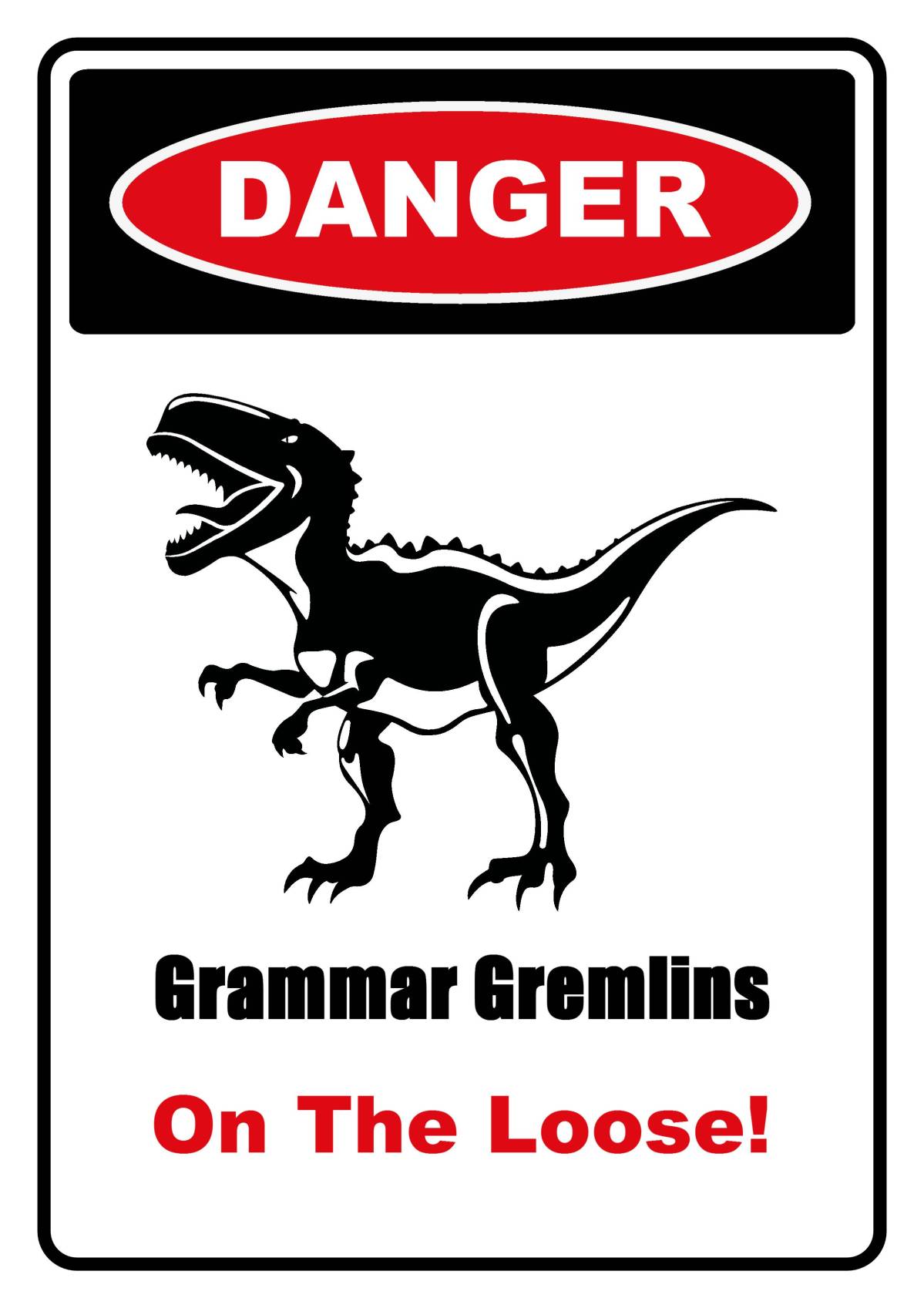
Grammar Gremlins

Enter your email address to subscribe to this blog and receive notifications of new posts by email.

© Copyright-All rights reserved by litworldinterviews.wordpress.com 2015

Should Indie Authors Self-Censor Their Books?

Indie authors get to publish anything at all. Traditional authors have their work edited – things get taken out. Probably things that could cause offense, as well as typos and grammar gremlins. Should you self-censor your writing because of the possibility of offending someone with a word or deed, and thereby open yourself to a couple of raging negative reviews? No – you never should. I must admit to a lot of hesitation inserting offensive things back when I first started out, but not anymore. I’ll write what I feel is right for the story whether it could offend or not. It’s fiction after all. There are things in all my books that could offend a wide range of readers if they chose to be offended, but I have more than enough respect for most lovers of the written word to realise that they’re generally intelligent and open minded, and that if they know that certain types of writing will offend them, they won’t buy those sorts of books.

Back before the advent of the internet and eBooks, readers didn’t get to rant on public websites and forums about profanity in books, or something that they for whatever personal reason find offensive. Writers are getting antsy, stressed and overly careful of what they write with all the political correctness around these days, but we shouldn’t be. For me personally I’ve read swearwords that turned a mundane sentence into something profound – or hilarious. Books are books, and we generally choose those that we’re fairly confident that we’ll enjoy. Writers aren’t the same as everyone else. They see things differently, with a different kind of clarity and insight I think, and they have the power to use the tools of their trade to convey emotions. That’s what reading’s all about – feeling the emotions turned into words by the author. And when writers do what they have to do and put their words on the page, that’s the end of that, and whether or not people choose to read or approve of those words, at the end of the day the choice of those words belongs only to the author. The words are our choice of the tools we feel are needed to get a reader totally immersed and involved in our tales. Whether they’re politically correct or not – profane or not. Our choice only.

We tell the stories as we want to, and write the words we want to write, but we have no control over how people read our books. I’ve seen a couple of terrible reviews of really good books purely based on small amounts of profanity in them. I’ve used a good few judiciously placed swearwords in most of my books, because they’re what came out as the stories were told. I won’t take them out, and I’m pretty sure that there will be more of them in future books of mine when they’re needed. Obviously we want our books to be read as we wrote them. I’m not suggesting that writers all over the place suddenly start adding profanity to every second sentence – unless they want to. Just that if an F bomb finds its way into a sentence to begin with, the word “darn” or “poot” or whatever is most likely not going to convey the emotion that we want to convey it the first place. Unless you’re ghost writing, only you get to choose the words, and don’t ever let anyone tell you otherwise.

As far as I’m concerned, a word is just a word. How you use it is what can create offense, and scribblers have all it takes to offend when they so choose. A writer has the equipment to turn someone into a soggy puddle if they choose to use their words as swords. There are words, harmless in themselves, that you can stitch together in a sentence that can cause soul cutting offense. And sometimes in a book, that’s exactly what you need to do. As far as I’m concerned the occasional use of a beautifully placed profane bomb is much more harmless than many, many other things in the world today. They’re just words.

There will always be criticism of books for things in them that have offended people, and all people are offended by different things, so this shouldn’t bother us overly much. It goes with the territory. There are readers of every genre under the sun, and they eventually find the authors they love. Nobody loves every book they ever read – if every book was fabulous then trying to stand out from the crowd would be futile anyway. Don’t ever try and change the writer that you are. Write whatever comes out. Whether your natural style is to swear like a trooper or to never use a word stronger than bottom, it’s all allowed, because if you try to change the writer you are, your words will end up stilted and fake. Be exactly who you are. I say cuss all you like if you so choose, and write the way you’re meant to write, and enjoy one of the most powerful gifts of being an Indie writer – the fact that you can. It’s bound to offend someone sooner or later anyway no matter what it is, and spending any of your time worrying about these things is a waste of good writing time.

tEREUy1vSfuSu8LzTop3_IMG_2538
Image Credit: Unsplash

What’s in a Name? Amazon Author Pages and Nom de Plumes

Authors use nom de plumes for various reasons. Erotica writers for instance, who don’t want their families to find out how they’re earning their crusts. Fictionalised memoirs are also books that sometimes could cause major problems for their authors if the people in their lives that are also in their memoirs find out. Especially if they are painted in an unfavourable light. This can lead to legal action, apart from any other sort of revenge the “injured” party might think to take. Hugely successful authors, like Stephen King who wrote as Richard Bachman, have dipped their toes into these waters for various reasons. Sometimes to see if they would be as successful if readers didn’t know their books had been written by them (I knew with King and Bachman though – before the truth was told), and sometimes simply because they don’t want to anger readers of a certain genre they write in by publishing a totally different genre, thereby possibly incurring accidental purchases of genres that are not enjoyed.

If you write horror, romance, and also children’s books, you can publish them all under your own name, and have them all listed on your Amazon Central Author Page, comfortable that the very different covers and blurbs are sufficient for readers to be aware of the genres. Or you can use three nom de plumes, and still list them all on your one Author Page, preferring that all your writings are kept in the same place. Possibly horror and children’s books don’t belong on the same page though.

Amazon allows you to have three separate Author Pages using nom de plumes on your one Kindle account. Only you will ever know that the books listed on them are yours, unless you choose to market them using your own name and marketing avenues. This means that you still have your current fan base to share the books you publish under your new nom de plume, and you can even add your real name either on the cover or somewhere in the front matter of all your books, as well as list them all on your website. The choice is yours though. Sometimes totally incognito is the way to go, while still being able to sell your wares, in which case open websites, Twitter accounts and so on using your nom de plume. Here’s how you do it.

1. Publish your book as usual, using only your nom de plume as the author, then find it and claim it as yours.

2. When the box opens for you to stake your claim, you’ll see the following:

You are not listed as the author of this book.
Do you see your name below?
Do you have a pen name?
If you write under a different name, let us know.

3. Click on let us know in the final option.

4. When you get a confirmation email from Amazon, simply click to confirm that you are the actual author of the book, and Bob’s your uncle!

You can then easily toggle between your newly linked Author Pages on Author Central from a drop down menu right beside your name, where it helpfully says, Click here to switch pen names. Then zoom off to assume your third alter ego, close the curtains, lock the doors, and write anything at all that takes your fancy. Your privacy is assured.

If you have more than three alter egos, then you need to open a second Author Central account with a different email address, but I’m pretty sure that three should do you very nicely.

Don’t forget to do the same on all the Amazon sites that you sell your books from. Happy flying under the radar scribblers.


2014-07-07 10.38.05

How to Create Downloadable Links to Give Away Books from your Newsletter Sign Up by @JoRobinson176

Most Indie authors at some point on their journeys will set up a newsletter to send to their readers. This is a great way to connect in a personal way, announce events, giveaways, or new books. You can sign up with Mailchimp for free, and it’s very user friendly. Sending out a newsletter is like having your own mini magazine. You can share anything you like. I write in multiple genres, so mine is easy to come up with content. Even if you only write in one particular genre you can still share your opinions, information you find interesting, as well as personal things about yourself and your interests. And of course – your books. A great way to get readers to subscribe is to offer them a freebie. As an author that’s easy – give them a book. You can either write a short story specifically to give away on your newsletter, or you can give them one of your novels or the first in a series.

Bearing in mind that PDF books make work for pirates easy, be very sure that you’re comfortable with your choice of freebie. For me personally, the first book in my Shadow People series is already widely pirated, so that’s the one available for free download when anyone signs up for my newsletter. If it’s going to be tossed around for free, then I prefer to be the one doing the tossing. It’s not difficult to set up. Here’s how you do it.

First have your completed manuscript ready. Add your completed cover in high definition by using the Insert > Picture function on Word on the first page. Then make sure that you’re easy to find by adding hyperlinks which are clickable from PDF to your other books, website, or any other place that you’d like readers to find you.

1 - Hyperlinks in PDF

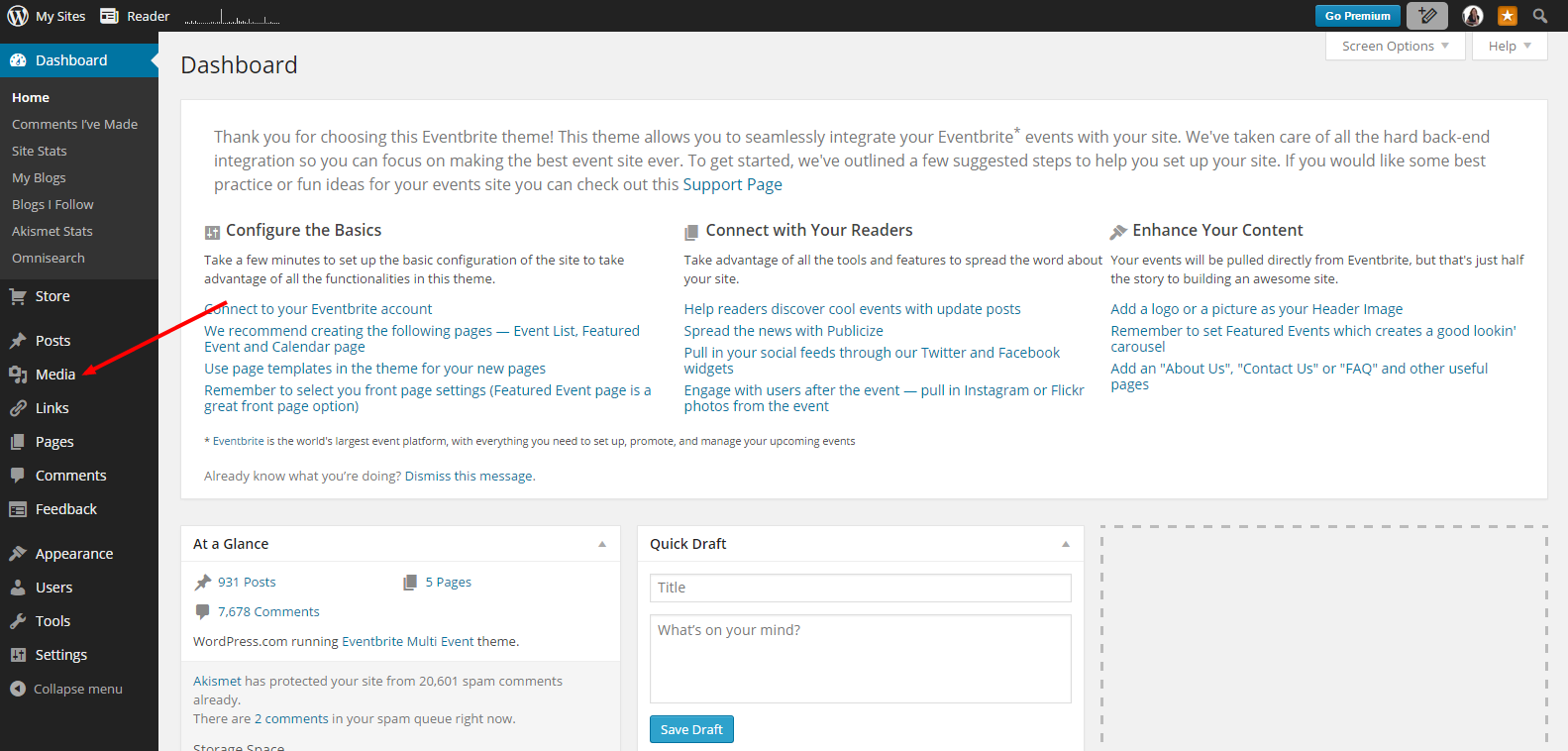
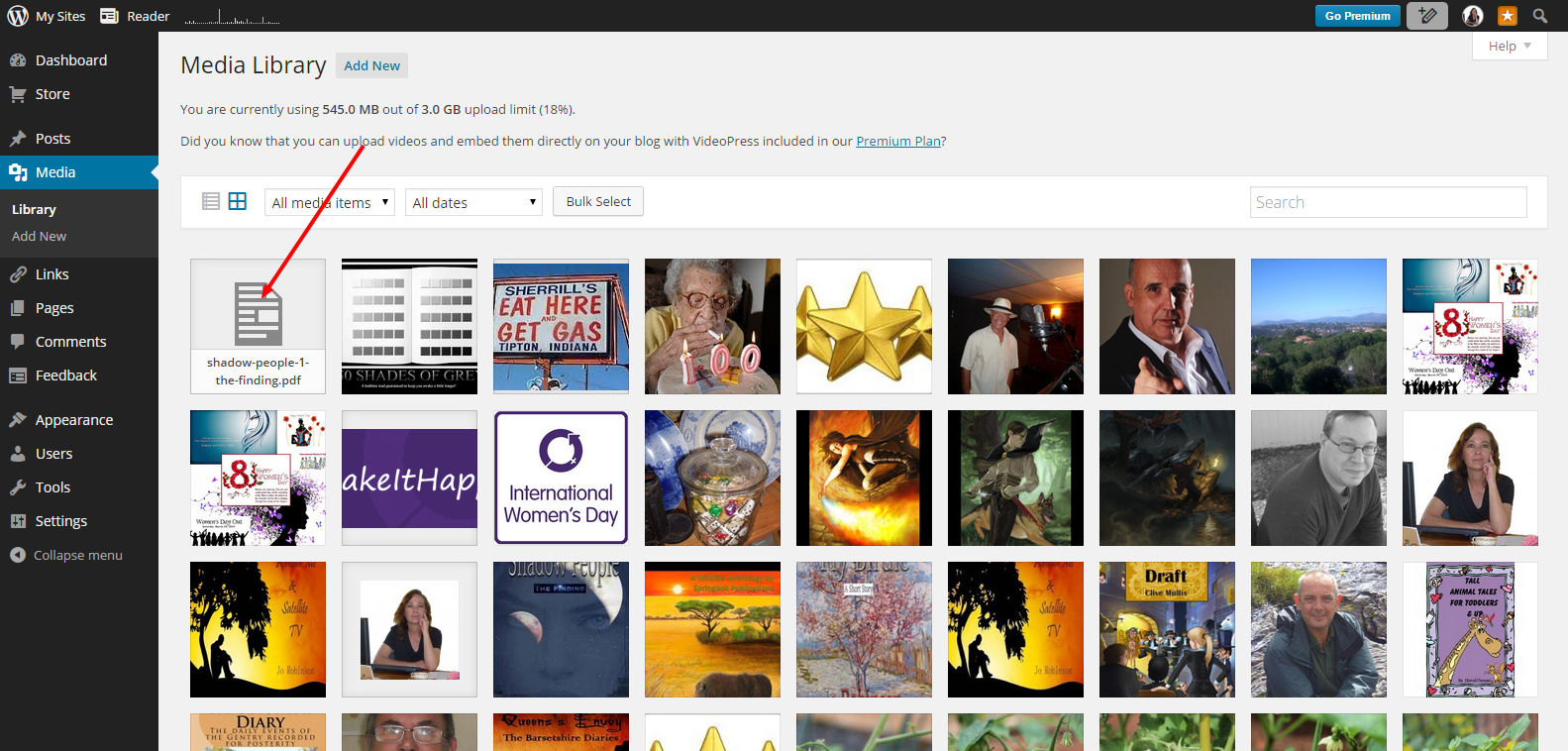
Save As a PDF file. Then head off to your WordPress site, and click Add New from the Media section on your dashboard.

1 - Media

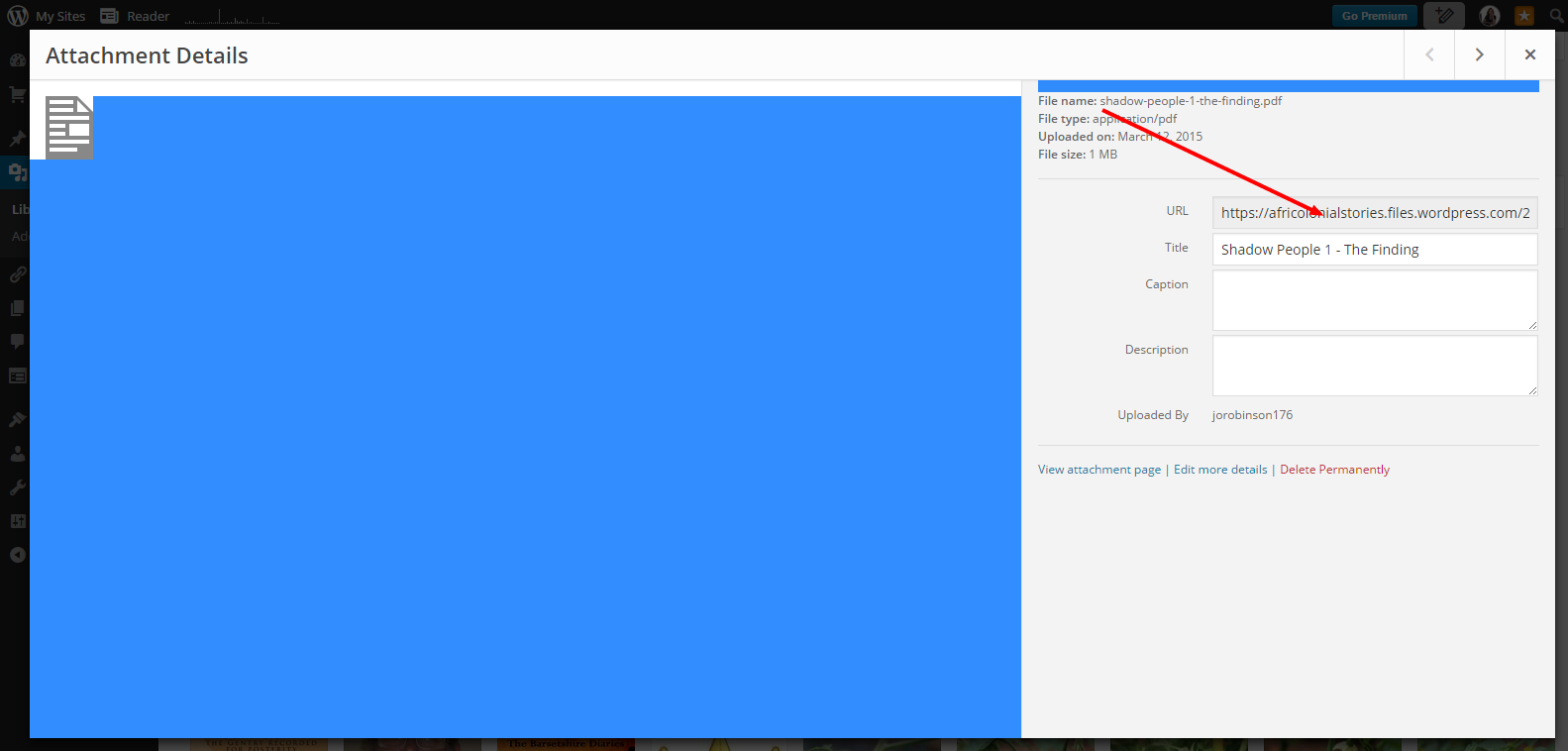
Select your PDF file, and wait for it to load completely. Then hit the edit button and copy the URL address. You can use this address anywhere you like to make your book available for free download.

1 - Select
1 - Upload
1 - Copy Url

Next zoom on over to Mailchimp and add it to your subscription confirmation thank you email. Just type the text that you want to appear above the link – Click Here To Download, for example, then click on the link icon at the top of the page and paste in your book URL. This is what it will look like.

1 - Final Look

Have fun building your newsletter, and don’t forget to add an invitation to subscribe on your blog and website.

Traditional Publishing Opportunity by @JoRobinson176

One thing I don’t understand is why writers firstly seek out small publishers, or worse still – vanity press. You’ve written a book – you think it’s fantastic. You’ve edited it and made sure that it’s the best that it can be. Why then would you send it to a publisher with three books on their list and sign your submission to them “from an aspiring writer”. If you’re writing, you’re not aspiring to write – you’re writing – you’re a writer dude! You don’t need a certificate to call yourself a writer. If you write you’re a writer. Yes. I’ve loved my self publishing trip. It’s been really hard work though, and there is no way I would ever submit any book that I’ve written to any agent or publisher that I thought wasn’t anything less than awesome.

If you’re going to be rejected, then get rejected by the best. Look up the very best agents in the world, and submit your novel to them. Expect to be rejected – all the greats have been. But don’t stop submitting to the best. So far, apart from a short story in an anthology, I only have knowledge of self-publishing, so I’m no expert by any stretch of the imagination. The further I go on my scribblers journey, the more I’m liking the word Hybrid. The best of both worlds. Finding ways to make your books appear to potential readers from the millions out there isn’t easy, and there’s no magic formula. Say what you like a about traditional publishing though, if your book gets published by one of the biggish houses, you’re most certainly going to have way more new readers for your Indie books as well.

It’s certainly worth a shot. A couple of publishers are accepting un-agented submissions at the moment. One that’s caught my eye is Hachette’s Tinder Press. As long as you’ve never been published by a traditional publisher – no matter how small a press it is, (except for short stories in anthologies) you can submit your book to them between now and the 15th March. Go for it I say. Even if your book is already self-published it’s eligible. Submit the first fifty pages in double spacing on A4, a short bio, and a one page single spaced synopsis as attachments to the email address there, and see what happens. Who knows? Your book could be the next break out novel of the year. So click on the Tinder Press link and good luck!

2015-03-05 11.38.00

Make the Back Cover of your Paper Book Work for You

What I’m about to suggest to you is something that I’m in the process of updating, and it’s not quite complete with all my books, so don’t yell “Liar, Liar!!” yet. I think it’s a really good idea for your paper books to act as the marketing tools that they should be for your other writing. Self publishing a paper book on Createspace is fairly easy. Writing a book blurb or synopsis, on the other hand, has always seemed harder than writing an actual full length novel to me. On a paperback, what’s on the tail is vital though. I think that it’s just as important as the cover design for a book that you hold in your hands to read. The first thing I do in a bookstore after glancing at the cover is turn it around. I read the author’s biography, eyeball his or her photo, and then on to reading the description. Obviously it’s the blurb that makes me buy or not buy the book, but once I’ve read it and loved it, I’m going to be wanting more, so if it’s a new author to me I head back to the bio and photo.

One of the wonderful things about self-publishing that not a lot of Indie authors take the time to consider, is the very active second hand book market. Once a single copy of your book leaves the presses it’s off on its life journey. Maybe it will be read and kept by the person who buys it, but sooner or later it’s going to go elsewhere. Books last longer than people sometimes, and some travel the globe. A lot of readers will only read paper books. It’s pointless talking percentages here, because even small percentages of millions of eyeballs is still a lot of eyeballs. People who regularly only read paper books are not likely to keep all of the books that they’ve read because they probably would like access to their beds and cupboards. They’ll give them away, swop them, or sell them at second hand book shops, car boot sales, fetes – all sorts of places. I buy lots of books, many of them new, but I’m a force to be reckoned with at the second hand book stall in any fete or event. I have piles of second hand books in my collection. So make your paper book back cover for that market. Readers like me.

The people who buy them won’t have any clue at all about ISBN’s and will most certainly not look for the name of a traditional publisher – most people can’t tell if a paper book is self-published or not unless they’re involved in the Indie world in some way. They’ll just be captivated by the cover, and then sold by the writing on the back. They’ll buy it, take it home and read it, and either say “Oy, what a load of….” or fall in love with your prose and want to read more of your work. As a reader, I assure you that I’ll go out of my way to find more books by writers whose books I’ve found at fetes or in other arbitrary ways, and Kindles are all over the place now – even here in South Africa. So we have to make it count. Look at a couple of traditionally published books on your shelves, and see how they do it.

2015-02-26 13.33.10

It’s obvious that we really should stick to the photo we already use on all our online sites to begin with – this not only gives you power on Google searches, but also makes you recognisable as time goes by. Keep your author pic for at least a couple of years when you first head out the gate before updating to a newer version, and don’t worry about the wrinkles or any other thing you probably wrongly think is gross. Readers aren’t expecting you to look like a Victoria’s Secret model – unless you are a Victoria’s Secret model. So – your usual online photo on the back cover with a short bio – top or bottom doesn’t really matter as long as it’s there. Don’t forget to leave your typed out website http address as well, to make it easier for your new fans to find you when they look for more of your books. Then the very, very best book description you can write. Even if it takes you a day – or two – writing a compelling blurb is more important than writing the book, because without it nobody will ever read it to begin with.

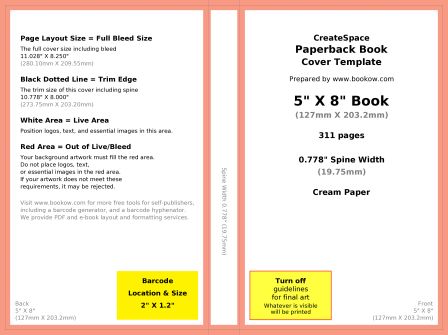
My current book covers have been made using Createspace online cover creator, where you insert your front and your back, and then choose a colour from what’s available for the spine, so they have boring spines. Unless you have a standard colour cover, you’re not likely to get an exact match, which is why I’m redoing mine now as full spreads. Either way you choose to do it, do update your paper book back cover so that you’ll be recognisable, and easy to find, no matter where it ends up. Go to Creatspace and follow calculations for your book, then download your book template. It will look like this.

Template Download

Open it in whichever image editing software that you use, create a new layer, and off you go. Make sure that there isn’t any pink left when you’re finished, while at the same time also being sure not to put any text in the pink layer or the barcode area. In fact to the left of the barcode could be the perfect spot for your gorgeous author photo and tiny bio. I’m not terribly good at finicky calculations, so I’m doing mine as three different layers – the front, back, and spine each getting their own. When you’re done, save as PDF and upload to Createspace.

Time Management for Writers

Writers must always have time to write, and we need to be careful of getting too involved in selling our wares rather than creating our wares. Marketing is vital, but….. We all know by now the importance of social media as far as marketing our books is concerned. It’s important to have a platform, with a few favourite sites where we interact with others. If you still have small followings, you might be complaining about too few likes, comments, or retweets, but I also see many overly stressed writers out there whose followings have grown, trying to move at light speed just to keep up with everything. I promise you though, you will reach a point where you can’t keep up without pruning a little.

How many blog posts do you read every day? Times that you take to read an article vary. I’ve timed a couple, and for me they take between a minute to up to ten or more minutes to read. Let’s even things out and say an average of three minutes per post you read. Ten posts is thirty minutes, twenty posts is an hour. If you’re reading a hundred posts a day, that amounts to four and a half hours – two hundred means that around NINE HOURS of your day has been spent reading blog posts. I won’t break down time spent on Twitter, Facebook, Google+ and so on. I’m sure you get the picture because it’s more of the same sort of thing. Responding to interactions on all of your sites takes the same average time per interaction, apart from Twitter which though quite zoomy, makes up for time spent in quantity of posts.

I personally adore blogging and the interaction there. I’ve made some firm friends thanks to good old Worpress, and I’m sure that even if I never write another book (ha haaa), I doubt that I could ever give up my blogging addiction. I learn things, laugh and cry about things there – it’s a fabulous universe. I think that we need to be a little careful of getting ourselves all tied up in knots when we break the “rules” that we see. It generally takes me at least a couple of days to catch up with comments or mentions on all my sites, but it’s something I always make sure I get to as quickly as I can. This unfortunately doesn’t mean that I can quickly catch up. Sometimes I’ve missed a comment, only to find it months later, to my cringing shame. I would never purposely ignore any comment, but as my online journey grows, it happens. And I never mind when a blogger takes a good long while to answer anything I’ve said on their blogs. I understand. Most bloggers do, so there’s no need for panic. We’re all living lives, some busier than others. Some writers are not only trying to write, edit, and do all the other things that need to be done in this new scribbling world, but are also dealing with problems, ill health, financial difficulties, or worse.

It’s important not to allow ourselves to get overwhelmed. I say this from experience, because it’s my character never to ignore anyone, and when I find that I accidentally have, it really upsets me. I often really do spend more than nine hours in front of my computer just catching up. The truth of the matter though, is that no matter how much we want to do every little thing that we think we should, it will get to a point where there just aren’t enough hours in our days.

It’s important for writers to manage their working hours. Right now I have a fairly loaded catch up pile to get stuck into (alright – I always have a loaded catch up pile), but I’ll never break my minimum one hour of writing per day rule. We should be making schedules for ourselves at some point. Daily time for writing, marketing, and the just for fun stuff should be determined, and unless there’s no choice, stuck to. There’s not much point if you’re spending all your time managing your platform if you don’t have the time or energy left to write books.

So I suggest to all you busy, busy scribblers out there, grab a notebook and pencil, and create yourself a timetable, with writing as your top priority every day, and then try and stick with it for at least a week. Don’t spend any more hours other than those you’ve allocated for social media. Do allocate yourself an hour at least a day free time – guilt free too – just because you’re a writer doesn’t mean that you’re invincible or a time growing master. Take a stroll – sit under a tree. Go a little easier on yourself. I promise you that nobody is sitting seething at the time it takes you to get to something – well, maybe there are a couple seething – but they really shouldn’t be. And if they are, well, that’s really not the end of the world. Doing the best that you can is all you can do – and it really is important to do your best, just don’t knobble yourself in the process.

Path

Protection by @JoRobinson176

Imagine your eighty thousand word novel disappearing before you publish it – never to be seen again. Obviously you know what your story is about, but there’s no way you could ever get it down just the way you had it after months or years of scribbling, tweaking, and editing. Imagine also all of those bits and pieces on your computer – plotlines for future tales – research – links – bookmarks – pictures – covers – lots of other important things – also disappearing. Or how about some crazy hacker fellow getting into all your online sites and wreaking havoc, stealing your stuff, and breaking all the windows. Scary thought, but all of these things have happened many, many times.

Spending money on protecting these things is even more important than spending money on editing or cover art to begin with. *Ducks to avoid missiles thrown by editors and cover designers* Seriously – your manuscripts and cover ideas need to be kept safe in the first place. Only if you really, really can’t afford it should you rely totally on free protection against these things. There are some really good free options to be fair, but they all come with limitations, so I think that paying for these silent warriors on your computer to automatically look after it behind the scenes is money well spent. If it is too expensive definitely use the free versions – they’re much better than not having anything at all, and you’re a lot less likely to be infiltrated with them on. Don’t only rely on one either. Go for a good anti-malware and a good antivirus at the very least.

Firstly, if you just consider the cost of your computer itself, even if you have nothing to hide or not a lot to lose, it’s still imperative to protect it from hackers. Those odd people enjoy nothing more than crashing total stranger’s hard drives just for the jollies, and never mind all the valuable things scribblers have lurking around in the depths of their machines- although most of us probably don’t have much to swipe from our author earnings accounts. So I recommend that if you can afford it, pay for the best. I don’t actually know what the very best is – only what works for me.

Trying to follow a blogger back the other day, my MalwareBytes shot up twenty (yes TWENTY – I’m a counter) blocked malware messages in very quick succession. Of course I headed out of there at a rate of knots (apologies for not following back dude). There’s a lot of malware popping up all over the place these days – for instance Huffington post ads, and there’s a particularly scary looking one around and about these days that won’t let you close any tabs – in this case RESTART or SHUT DOWN. DO NOT click on any exes to get rid of the pop up if it looks dodgy – just head straight down and either shut down or reboot – much safer.

Personally I think the more the merrier. I pay for all my protection, and use the premium packages of Malwarebytes, Bitdefender Antivirus, Zemana AntiLogger, and a couple of others just for the hell of it whose names I won’t share just in case there’s a crazed hacker out there with a burning desire to get his sweaty paws on my latest pics of lizards. Maybe this is overkill, but I have had a computer totally destroyed by malware before, and lost so much that I cried. Some of these services have free options, and these are good, but you have to update and scan regularly yourself (every day), whereas the premium versions are automatic, with pop ups when they find or block something nasty so you can head off to where they’re quarantined and zap the sods permanently.

Other than hackers and malware or viruses, there is the possibility of your computer crashing due to malfunction. It’s important to have external backups of your work, or anything that is important to you. For this, you can choose to go the easy route by simply emailing attached WIP documents or images to yourself, and storing in a folder on gmail (or any other email provider). Again – maybe email sites are vulnerable to hackers, so some sort of external hard drive or a small collection of USB’s would do the trick better. There’s also Dropbox and other cloud storing services. Personally I’m a little neurotic about storing my manuscripts on them, but a lot of people swear by them. Stay safe scribblers.

Jo Robinson


narc12349n1t-2
Click For Jo Robinson’s Latest Book

Jo Robinson


@JoRobinson176

africolonialstories.wordpress.com


Enter your email address to subscribe to this blog and receive notifications of new posts by email.

© Copyright-All rights reserved by litworldinterviews.wordpress.com 2015


Genre Blending

Before I finished my first book, I had a list of all the top agents and publishers in the USA and the UK. The very thought of going Indie struck me as amateurish and pathetic, and it was going to be big time or bust. I had my synopsis ready, and my query letter. The more I learned about Indie publishing though, the more I fell in love with it, and by the time my first book was finished I had a totally different plan. I didn’t kick the option of traditional publishing to the kerb – I still haven’t done that. Even though I’ve never queried, I try never to say never, but I wanted to explore the amazing new world of anything goes first.

As an Indie writer you get to write about anything under the sun – satire – taboo – trigger inducing – revolting – weird – boring as watching paint dry – anything at all. I don’t want to read most of these things, but quite a lot of people do (alright – maybe not the paint drying), and with it being incredibly unlikely for some of these things being published traditionally, quite a lot of Indie “books” are making a lot of money this way. Who knew dinosaurs could get up to what they seem to get up to these days?

Apart from all that though, there is still a lot of new ground to be broken with genres and niches that traditional publications very likely wouldn’t take chances on, but with the very real possibility in the Indie world that they could take off with a bang. I fully intend to utilise my self-publishing freedom to mix things up with a couple of sets I have planned for the future. The thought of making up whole new genres is exciting in itself because I honestly believe that the real growth of the Indie market has only just begun, and isn’t going to implode under its own weight as a couple of people are prophesying. It’s going to be about brand new ideas and new ventures into the unknown, and maybe not so much the picking of genres and niches that rocketed unknown authors into the stratosphere a couple of years ago.

We’re going to have to think outside the box if we want to be noticed in amongst the millions, that in all probability in a couple of years will be billions of books out there. So maybe try mixing things up for your next story. You have nothing to lose. Think Fantasy Western, or Historical Weird, African Sci-Fi Paranormal Romance. Botanical Horror. Flower Fantasy. Why not? Anything goes in the world of Indie – try and imagine the never before done, and you could very well hit on the next big thing.

2014-06-18 09.16.17.jpg1.jpg2.jpg1.jpg2

Authenticity and Honesty as an Indie Author by @JoRobinson176

A couple of things we shouldn’t be doing. Sometimes you’ll see an author comparing their writing to a famous writer in the actual blurb of their book, or worse still on the cover. Doing this in a blurb is actually against Amazon policy, so it’s not a good idea to begin with. Some Indies seem to think that by the mere presence of a bestselling author’s name, readers will be more inclined to buy their own book. Speaking as a reader all I can say about that is that if I want to read a book by J K Rowling I’ll buy one of her books. If a reader or reviewer on the other hand compares a book to the work of a famous author I’m a fan of, I might be tempted to buy it – that to me is a genuine compliment, but if it’s the author making the comparison it always comes across as a little desperate to me.

Desperation doesn’t sell well, and readers aren’t stupid. We prefer authenticity in the books we read. Why on Earth would any writer want to hang on to another writer’s coattails? I’ve heard that copying famous writer’s styles can be a good writing exercise, although I’ve never tried it myself. I’d much rather stick to my own style, whatever that may be, than to try and sell anything on the back of someone else’s success. Every time a book makes it big there are suddenly thousands of copycat versions dumped onto the market, and none of them will ever have the impact of the original. Every writer has their own unique writing voice, and we should always be true to that – even when we’re selling our wares.

Another thing I’ve seen is #1 BESTSELLER plastered on the cover of a book. Then I’ve looked at the book’s ranking, and it’s at two million and odd. That’s not a bestseller and I don’t appreciate the attempt to con me. I’ve read several comments from Indie authors saying that it’s the truth because at some point their books have been number one on a free list. That’s just way beyond wrong so don’t do this. We’ve all been in the paid bestseller lists at some point or another, but if you honestly want to put that on your book it must have been number one on the main list, and if it reaches that beautiful spot everyone will already know what it is.

I always use the Look Inside feature on Amazon before I buy any book. A huge mistake some Indies make is to put pages and pages of reviews in their front matter. Often you haven’t got to the end of them before the preview ends. No book purchase from me in that case. I don’t have a problem with a few lines from good reviews on a single page, but more than that – yes – again seems desperate to me. Readers will read the book reviews anyway, both the good and the bad, so the reviews in the front matter aren’t going to mean anything except that they’re taking up too much space. The last thing about using reviews in your book is actually using them on your book. Fine for if the book has reviews from Kirkus or something like that, but putting one of the three reviews that the book has on your actual cover is not a good idea at all. The last time I saw this I cringed in shame on behalf of that author.

As self-published authors we have to act professionally, respect our readers, and credit them with the savvy to spot things like this. We should trust in our own authenticity and have the patience for it to be seen for what it is, and hopefully enjoyed for its own sake. Image1000

Advertising Your Book

Most of the reading public are not part of writers social networks in any big way. They probably all have a personal Facebook or a Google+ presence, and quite a few people these days have Twitter accounts to see what the Kardashians world is up to. A lot of them are on the mailing lists of book recommendation sites though, and that’s why an important part of marketing should be popping your books up on them now and then in addition to your normal tweeting and sharing on your regular sites.

If you can afford trying for a listing on Bookbub then that’s a good option, but not only is it going to get more difficult to get accepted there now that traditional publishers are using it, it’s also quite expensive. That doesn’t mean you have to do all advertising yourself though. There are a couple of much cheaper options to go for, which while they might not pack the punch of Bookbub, they’re still going to get you more eyeballs on your books, and hopefully a couple of sales from new readers.

I have to say that I haven’t done any serious marketing for my books, so I wouldn’t even try and call myself an expert on selling books. I’ve always worked in marketing though, so I have a bit of an idea. From what I’ve seen so far, I think that the marketing of eBooks is actually the toughest job in the sales world – especially as an Indie scribbler trying to get noticed. It’s always been my plan to write three to five books before I got too involved in the selling of them, and over the past year or so I have been poking around and about for ideas for when I do. As a test, I’ve run one of my books a couple of times on the smaller sites expecting nothing at all to happen, and was really surprised when it actually got sales.

So when you’re ready to promote your books, I suggest that you prepare your strategy, choose your promo days, give yourself a budget for advertising, and put it on a few of the cheaper sites. Most of them require a specific amount of reviews in the upper star range, but not as many as you need for the bigger sites. I got the most sales when I ran African Me & Satellite TV on Choosy Bookworm, but also a couple from The Daily Bookworm, and a few from People Reads, who will also advertise your new release before it has any reviews.

When you’re finally ready to start selling your books, you really should be paying for advertising if you can afford it, and the three sites above have prices starting at eight bucks, so even if you don’t sell too many books to begin with you won’t be lining up for loans either. While our conventional marketing ourselves on Twitter and so on is vital, our aim should also be finding a portion of those millions of ravenous readers out there who don’t have a social network presence, but do subscribe to book mailing lists.

Image1004

Safe Reviewing by @JoRobinson176

It’s important not to tarnish your brand when you’re in the public eye – or to invite others to tarnish it for you. No matter how small a fish you might think you are. As an Indie author you really do have to be reading books by other Indies as well your traditionally published favourites, and leaving reviews for our peers is absolutely necessary for the good of the whole tribe. I will ask you one question though – how many times have Dan Brown or J K Rowling publicly published a bad review of their peers? They don’t, because there are reviewers out there who get to do those things, and they probably don’t want to get into barnies with other scribblers either. If you have set yourself up as a book reviewer as well as an Indie author that’s fair enough, as long as you’re prepared to take the possible fallout if you post a less than rosy review. I’ve seen troll brawls caused by a bad review that almost had me under the desk, and I wasn’t even involved, with authors taking down their books and bowing out of the industry.

I am not an official book reviewer. I do review books, but never publicly if I really haven’t enjoyed reading them. It’s not just because I don’t want to be the target of some troll rage takedown, but more because I know how much goes into the writing of a book. Not everyone can write a book. Even though we cringe at the thought of the millions of eBooks out there competing with ours for visibility, the fact is that less than one percent of the population of the planet are writers by trade, and that not all of them write good books. Their bad books are not hurting yours at all, so there’s no need to trash them when there are many non-writers who can and will do so with relish. We’re a little old segment of the planet, and I honestly don’t think that tearing each other down is the way to go. Especially if you have your writers eyeball out when you read a book and pick up on grammatical errors, expecting a novel to be written according to rules.

I haven’t written all my life, but I’ve read all my life, and I can tell the absolute difference to the way I read any book these days. I see things now that I never would have noticed before, but mostly I choose to unsee them straight away if I know they’re something I wouldn’t have picked up on back in my pre-writing days. So far I haven’t seen any writer who is also a book reviewer give a blatantly unfair review, so they’re mostly safe, but you have to ask yourself if posting a scorchingly bad review on any public site is worth the possible damage it could do to your public persona as an author.

On the other side of the coin, leaving a glowing review for a book that you didn’t like at all could also affect your credibility, so don’t do that – rather abstain entirely and move on to a new read. Lately there have been a couple of furores in Indie world about all sorts of things from attempts to get funding to take time off to write a book, to vicious troll attacks and catfishing. We all should realise that there are a lot of people out there on the internet who will attack with the slightest provocation, and sorry to say, some of them have written books, so I suggest that we stick to doing what we love best, and leave the review takedowns to the many people who enjoy that sort of thing. We’ve got much more important things to be getting on with than spending any of our time trashing anyone else’s book publicly. If you can’t give it three or more stars, just let it go.

Bad Editing

Book Cover Design – The Law

The only way to ensure that you have a one hundred percent original, and copyright infringement free cover for your book is to either make it yourself with all your own images, or purchase a bespoke artwork, specifically created for you. Not everyone is inclined to create their own, and bespoke book covers are very expensive, so many Indies use images bought, or downloaded for free online. Before we actually use these covers, there are a couple of things that we need to know.

All photos and images found online are automatically protected by copyright. If you download any picture without permission or payment, thinking that if you just fiddle with it a bit and change it with a bit of judicious rendering it will be alright, that isn’t true, and you are infringing on the copyright of its owner, and could find yourself in quite a bit of expensive trouble. Even if you didn’t know this when you did it.

All commonly used free images in the Creative Commons have licenses, and it’s very important to read these carefully before using an image. Many of them are free to use and change as you wish for commercial use, but there are often other instructions in the license box. Sometimes there’s a limit to how many of your final product you may sell, and sometimes attribution is required for any use of the image.

If your cover designer has committed copyright infringement in any of the elements on your book cover without you having any clue about it, you are still liable for that infringement from the minute you publish it, so you need to be very sure that any cover you purchase has been made by a designer aware and respectful of these laws.

Thinking that it is highly unlikely that you’ll ever be found out is also not a good idea. Most professional photos and images are fingerprinted so that they can easily be tracked online, no matter how much they’ve been altered. Artists and photographers these days are getting more and more outraged at the theft – innocent or otherwise – of the work that they do in order to earn their livings.

Images in the Public Domain (pre January 1, 1923) are safe to use as you like, although sometimes attribution to the photographer is required. Not very often though. So those are good to go.

Stock images are safe if used correctly – paid for or downloaded from a site like Dreamstime when offered for free. You can do anything you like to them once you have them and use them as many times as you wish. Read licences carefully first to make sure that they aren’t Rights Managed images, because those have restrictions on various uses.

These rules apply to all publishing – including publishing posts on your blog. I’ve been guilty of using images just hoiked off the internet before I knew these things, but now I’m incredibly cautious before using a picture I’m not sure I’m allowed to use. Fortunately one of the biggest boobs I ever accomplished was to delete every single image in my media gallery from the beginning of my blog. I was devastated at the time, but quite relieved now to know that there’s nothing lurking around there anymore that could get me sued.

So now you know all of these things you might be thinking that you’re not going to be able to find anything decent for your cover, but that’s not true. There are great images out there both free or at a cost that you can afford, so go for it intrepid Indies! My last two thoughts on the cover subject would be to be absolutely sure that you trust your cover designer if you take that route, and secondly to check the popularity of a purchased image if you’re planning on using it as is. There are loads of eBook covers out there using different versions of the same image. Same Cover 1Same Cover 2

Writers Resolutions

Happy New Year fellow scribblers! It’s that brand new shiny first day of another new year, sprinkled with fairy dust, hope, and endless possibilities. Writers all over the world are cracking open the first page of their special edition unicorn diary and filling it with resolutions for the year to come. Some writers are also staunchly refusing to write that list on the grounds that these things just set you up for disappointment when you fail to reach all your goals. I see their point, which is why my resolution for this year is to not set myself unrealistic goals. For those of us who like a challenge, I’ll share a couple of my favourites.

Be Gentle with Yourself

If you’re going to set yourself deadlines to publish, or minimum daily word counts for this year, it’s a good idea to err on the side of caution. Just because you know that you can comfortably write two thousand words a day doesn’t mean that life will allow it. If you think that you can have your new book ready to publish or submit by the end of March, set your deadline for the end of April instead.

Get Organised

Writing is not only your passion, it’s also your job when you choose it as a career, so try and be professional with all the accoutrements of your trade. If you can, have an “office” – a place to set up your computer, files, books, research, and the twenty five thousand gorgeous new pens in your collection. A place where you work. Set your working hours, and try to stick to them every day before doing anything else.

Do Your Most Important Research

Your most important research if you’re a fiction writer is to read. Always have a book that you’re reading. Who said work wasn’t fun?

Look After Yourself

Writers are the worst for forgetting about their own wellbeing. We get lost in the stories and bang away at our computers for hours before surfacing and wondering where the day went – or the night, and having to fight our way through piles of chip and sweet packets to get out. Then we’re just too tired to do anything other than what we have to. Make an effort to give your body a little TLC with a bit of healthy exercise, relaxation, and some good food and sunshine. Laughter helps too.

Play a Little

Write something out of your comfort zone. Something you think that you can’t do. Write a short story in a genre that’s foreign to you, or play around with your writing style.

Finish It

We all have hundreds of half finished things lurking around, that we’ve started and then totally forgotten about. Dig around in the murky bowels of your computer and find one, and then finish it.

Own It

Writing is something that nobody gets to tell you how to do. Apart from having to learn about grammar and spelling, your learning to write comes only from reading the works of others, and having the talent and whackadoodle magic scribbler’s imagination to do it yourself. Let it flow naturally and without fear.

Be Careful Who You Ask

I’ve seen a lot of new writers have all the wind taken out of their sails by asking for critique. Too much and too often. Rest assured that there are many, many pontificating and self righteous people lurking around critique groups just waiting for a newbie to pounce on. They will rip the soul out of anything you submit purely for the pleasure of being the awesome super cool dudes that they think they are. Don’t lose your dreams to these people. If you’re not confident enough to write on through till you’re finished the book before asking for critique, be yourself a lurker and watch from the sidelines before putting your baby before the wolves.

Back Up Your Work

There are loads of free and paid ways to back up your work, and you should do this Every – Single – Day. I lost tons of manuscripts, research and cover art when my old computer crashed. You could use a memory stick, Dropbox or simply email your manuscript to yourself when you’re finished writing for the day.

And so onward and forward my fellow people of the pen, into our shimmering new year, I wish you all a prosperous one, filled with happy days of writing, and writing, and writing.

HNY1

HTML Crib Sheet

Because Christmas day is one of the few days when Indie writers can’t think up good enough excuses to stay hunched over hot computers in their garrets, and the time of year when they totally invest themselves in the overconsumption of mince pies while staring resentfully at their abductors, and probably drink too much eggnog trying not to think about their abandoned work in progress, I’ll keep this Thursday’s post very short with a couple of tips for those nontechie scribblers amongst us.

1. Create a clickable link to go into your eBook. Type the text as you want it to appear in your manuscript – the name of another book for instance. Highlight that text and right click on it. Select Hyperlink and paste the URL address into the box and save.

2. If you find it painful creating HTML for clickable links on your blog posts, go to Ecalpemos and you can generate them there.

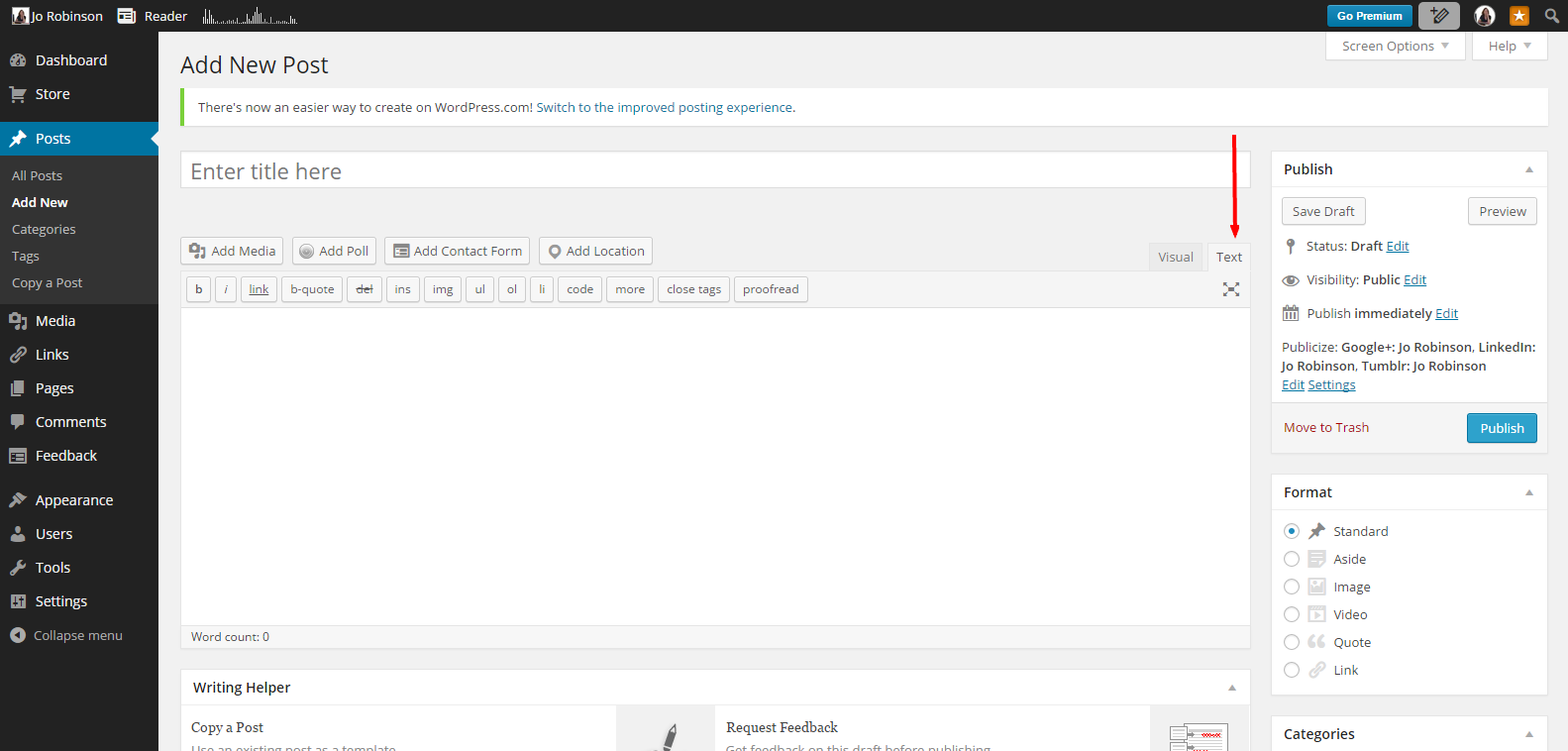
3. Instead of inserting all the HTML code yourself, if you want to create a post complete with pictures, links, and text to send out for a blog tour, click on your Text tab in a new blog post, create the post there and then copy and paste it onto a Word document. Double check before sending it out by copying the text from your Word doc, pasting it into a new post, and checking in your preview window to make sure all is as it should be.

Add New Post ‹ Jo Robinson — WordPress.pngtext

4. Remember that all HTML posts must be done in your Text tab, and not the Visual one.

Add New Post ‹ Jo Robinson — WordPress

Happy Holidays!

Christmas Baubles
Christmas Baubles

Making Your Own Cover – For Absolute Beginners

I know that everyone says that we should pay for cover artists and editors, and if we can afford it, I really think that we should. However, that probably makes us hybrid authors – who knows? So, in the spirit of the Absolute Indie, slaving away in a garret with a shortage of funds, we should know how to make a decent cover ourselves. Most people have either an iPhone or an Android these days. These phones take amazing pictures, and have all sorts of features from sepia effects to zoom and macro capabilities. No, no. Come out from under the desk my technophobic scribblers. It’s not that hard, and even pics taken with really old dinosaur phones can be manipulated into really cool covers. Let me show you the basics.

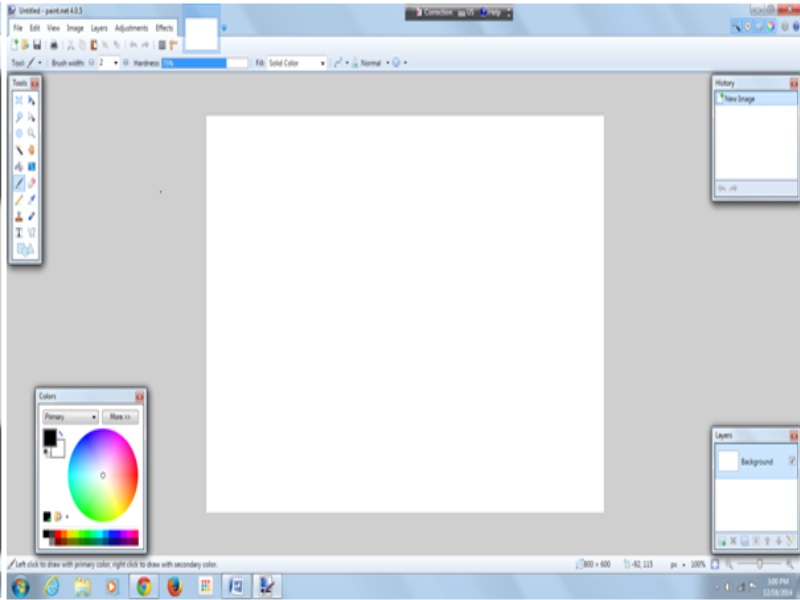
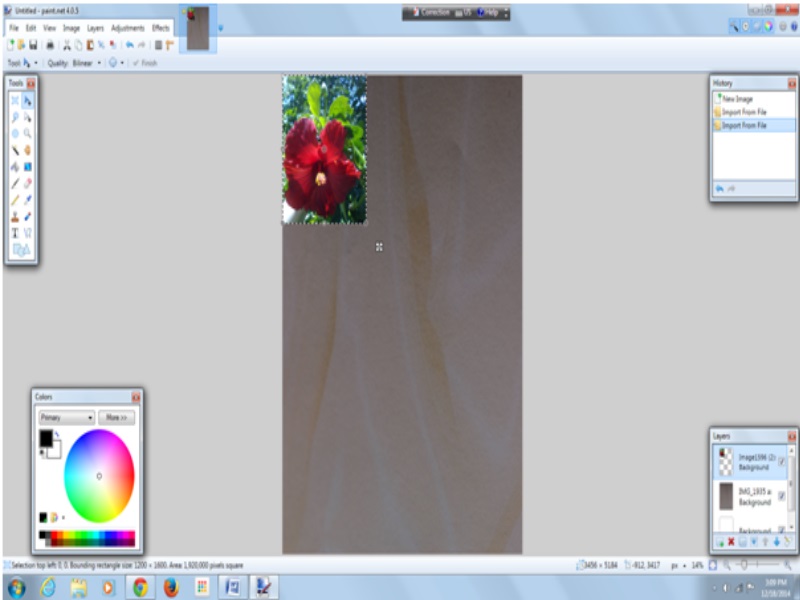
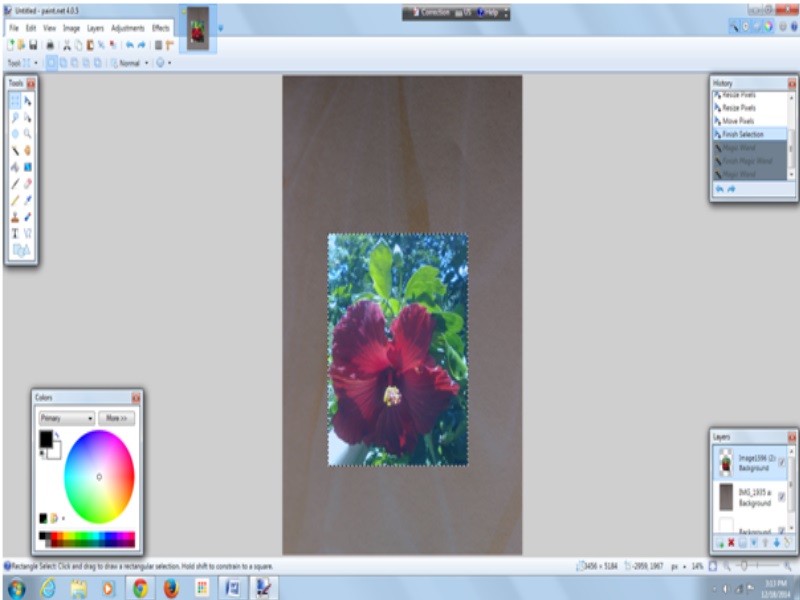
I’m going to be using one of my favourite programmes for this because it’s very easy to use. So if you’re a total newbie at cover creation without any software already installed on your computer, the first step is to download Paint.net – it’s totally free. Once you’ve installed and opened it, you will see this screen.

1ss

Click on the Layers tab (fifth from the left in the top ribbon). Select Import From File and upload your background image. You can find something in the public domain to use or pay for one from sites like Shutterstock or Dreamstime, but MAKE SURE that it is free to use for commercial purposes. Or you could take your own background photos or scans – I’m using a photo of a piece of fancy paper here.

1sss

Now go back to the Layers tab and click Import From File again to start working on your next cover element. I’m using an ancient photo from my computer taken with an ancient cellphone.

1ssss

Stretch it out to the size you want it to be, and move it to where you’d like it to grace your cover. Go to your tools box in the top left corner, and select the square in the top left corner of it.

1sssss

Drag your cursor over parts of the image background that you want to delete, and then hit the scissors icon in the top ribbon. Do this as many times as necessary to remove large patches of unwanted background.

1t

Now select the Eraser in your toolbox (sixth down on the right) and play around with it – use the Brush Width in the ribbon above for thick sections to erase or thin fiddly bits of background. Take your time and use the Undo button (left facing arrow in the top ribbon) to go back as many steps as you like. Go back to your toolbox and select the triangle icon in the top right corner, move the image around or turn it until you’re happy with it.

1tt

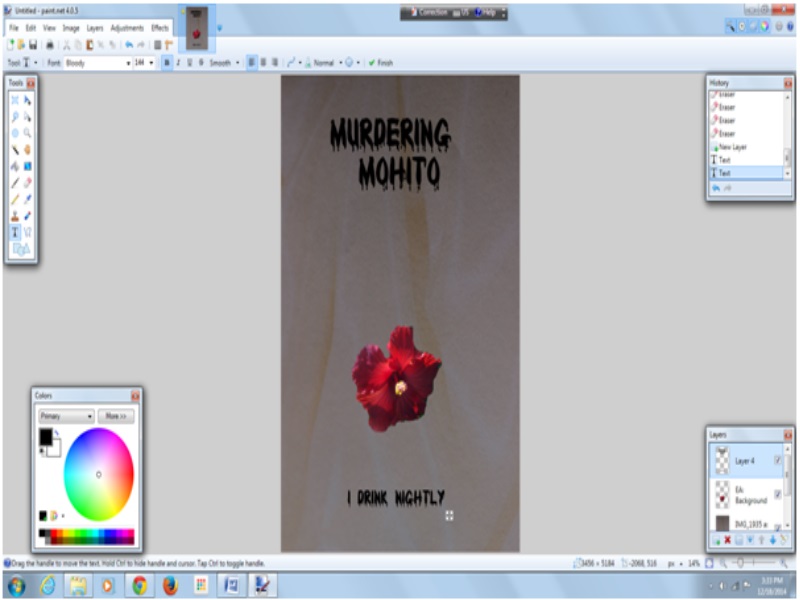
If you’re happy with your image the way it is then you can begin to add text. Or you can add another layer as before. In the Layers box in the bottom right corner, select the icon on the far right to adjust your current layer’s opacity, which will make it as see through as you like. For now I’m going to pretend that this cover is just awesome, and add some text. First go to your Layers tab, and select Add New Layer. Then select Text in your toolbox. Choose your font and font size, and click on the font colour you want in the Colour box in the bottom left corner. Click on your cover where you want your text to begin and go for it.

1ttt

When you’re happy with your cover, click Save As and select Save as Type JPEG (Underneath the image title) and there you have your cover. Check on the requirements of the various online booksellers as far as size requirements are, and go back to Paint.net and resize in a flash.

I’m not even going to pretend that this particular cover could ever be used (it REALLY couldn’t be – in fact it’s a perfect example of the hastily created covers that give Indies a bad name), because a good cover is going to take longer to make than the time it took me to write this post, but I want to share the very basics of making your own cover easily. If you play around with this programme you’ll learn much, much more, so there’s no reason not to make a really attractive cover of your own if you’re short of cash, or simply if you fancy doing it yourself.

Friendly Follows

Unless you’re writing purely for yourself, your aim is to sell your work to readers. Selling is a word that often has Indie authors running for the hills. It shouldn’t though. If you want people to read your books, you’re going to have to have them buy them to begin with. There’s nothing torrid about selling your books. Nothing to be ashamed of. So do it. Sell that stuff. But sell it politely. One of the most powerful tools for Indie authors to find readers is Twitter. Unfortunately some of the really hardcore OY BUY MY BOOK brigade have muddied the waters there a little, with their ad nauseam spamming of their books without ever posting anything else. That doesn’t mean that Twitter won’t help you sell books anymore though. You just have to be patient, post interesting content other than only your own, and behave socially.

I often come across Indie authors around and about, who are incredibly selective as to who they’ll follow on Twitter. Unless you’re J K Rowling you’re not going to be successful if you’re expecting thousands of people to follow you for no other reason than that you wrote a book, without any sort of reciprocation. Theoretically it’s better to give than receive, but not so much in cyberworld these days, and if you want to be noticed at all, you have to give. Whether you’re giving information, having lively chats, or just sharing something beautiful, these things will catch the attention of potential readers much more effectively than only ever sharing things about yourself or your books. The same goes with who you choose to follow or follow back.

If you weren’t selling or planning to sell a book, would you have signed up for Twitter? No? Then insisting on only following back other writers, or even more precisely, other writers who you think are “worthy”, is seriously counterproductive.

Just because you’re a writer doesn’t mean that nothing else interests you. Writing is your job, and what defines you, but everyone has things that they love to do when they’re not doing their work. Gardening, cross stitch, cooking, art, making really cool medieval chainmail out of bottle tops and pink paperclips. The same goes for chefs, university students, secretaries, CEO’s and plumbers. Possibly what they love to do when they’re not working is to read books, even though it would never occur to them to write one. That guy who followed you who has 178 followers, and tweets about how cool his beer belly is, is a potential reader. And when you – author of note – follow him back, he is most chuffed. He notices you. Retweet the photo of his epic beer spill that formed the shape of a perfect frog bottom on his t-shirt, and you could very well have your first fan. A reader who has not ever considered writing a book. How would you feel if J K Rowling followed you back? And then retweeted you. Not quite the same league, but I’m sure you get my drift.

I only follow two people who don’t follow me back, and unless I find any particular account particularly offensive, or obviously a bot, I follow everyone who follows me. I personally enjoy Twitter, but I know that a lot of authors don’t. They see it as a chore, and something that they have to do to sell their work. I recognise them. They’re the ones tweeting only about their own books, and never retweeting anything at all. So when I see their gravatar in my feed, I very seldom even look at what they tweeted because they’ve already shown me what to expect. Then there are the writers who are trying to build their marketing platform before they publish, which is a brilliant idea by the way, but some of them also only ever post about the book they’re writing. These things are boring if they’re all you ever share, and are never going to grab attention in Twitterverse.

As well as following authors and writers, also follow people who tweet about the things you love apart from writing, and interact with them. Look at the profiles of people who follow you, and follow them back. Look at their tweets and retweet them or reply to them. Make friends out there, and as well as finding future readers for your scribbles, you just might start having a little fun while you’re at it. Don’t just send out your book links, because that’s guaranteed to get your posts muted by many. Selling your books this way really can be fun if you choose to make it so.

Flying

Write on Through

Whenever I get a huge idea for a new story, I generally stop what I’m doing and open a new document, give it a temporary name, and write down the first couple of sentences and notes. I have lots of these lurking in my WIP folder, but I never allow myself more than ten minutes to create them. Then I leave them alone, to wait until I’ve published what I’m currently writing. I do write more than one book at a time, but I haven’t ever abandoned any of them in favour of starting something brand new, and working on that instead. Many times I get to a place in a book I’m working on when the next thing to happen refuses to reveal itself to me, or I think that the whole story is a lot of rubbish anyway, and getting stuck into something shiny and new would be a much better idea. No matter how much I really, really want to start in on my new idea, I won’t allow myself to do that. Because if I do it once, I’ll do it again, and then maybe another time, and if I’m not careful I could end up with piles of unfinished books and nothing ever ready to be published.

I’ve never heard any famous author say that writing is easy. It isn’t. It’s really hard work. I think that writing is like any other job though, in the way that the more you do it the easier it gets. When you begin an exercise regime you might only manage a ten minute workout, and you have to push yourself through the pain to get fitter. You have the choice of deciding that it’s way too difficult and try something else instead, or to carry on pushing until you reach your goal. If you give up, you’ll be disappointed in yourself, and will never know what you could have achieved. If you choose to keep going, those endorphins are going to give you a happy face every time you complete your workout, especially if it was hard, and eventually you’re going to reap the benefits of all your work with your taut new body, and years added on to your life.

I think that writing’s just the same. When that next sentence just won’t come, you can just drop it and try something new, or you could write on. It’s at these points that I allow myself to write anything, no matter how stupid it sounds, because eventually the tangled threads will unravel, and I’ll see where I need to go. My goal is always the final sentence of the story I’m working on, and then I get to reap the benefits of getting it published. And those writerly endorphins give me a happy face every time I add to my story. There’s always a sense of accomplishment whether it’s one hundred or two thousand words. Not writing anything at all on any day generally brings on anxiety, because I know that the longer I leave it, the harder it will be to get back into. Just like exercise, you have to keep your scribbler muscles in shape. So it doesn’t matter how many new stories you start writing. If you don’t push through on the books you’re writing now, you stand the chance of wasting a whole lot of time, with only a pile of partly written stories to show for it.

Lewis Carroll
Image Credit: Public Domain Review