Is an eBook a Book?

What is a book? Is it the paper that it’s printed on? Would it still be a book if all its pages were blank? Technically – yes it would, but it would be a book to write in rather than a book to be read. An eBook is a book. Even one day in the far future when we read by hologram or crystal brain implant, books will always be books. To some, the pleasure of reading a book includes the feel of it in their hands, and the pleasure of turning an actual page. These days I find reading eBooks a lot more pleasant, although I still enjoy paper now and then. Paper books cost more than eBooks because of the production costs, but at the end of the day what we are selling isn’t paper, it is the stories within. We need to look at eBooks for what they are – books, and give them the same love when we publish them as we would our paper books. They need everything in them that you would put in or on a paper book, and that includes a blurb. About This Book.

I’ve mentioned this before in passing, but I think it deserves its own conversation. When you buy a paper book, you look on the back to see what it’s about. If it’s by an author that you recognise and love there will be the familiar titles that you’ve read in the first pages of it to nudge your memory. When you take that book home and put it on your bookshelf to read later, it will still have those things many months later when you’ve forgotten all about buying it amongst your other pile of book purchases if you’re a voracious reader, as most writers are. If for some reason the book description were to completely disappear, possibly it’s not written by an author you know, you’ve totally forgotten what it was about, and all you’re left with is cover art, would you choose to read it straight away rather than another book with all that about the book information still there?

We need to stop thinking of eBooks as not real because they’re not physical in the real sense of the word. I actually think that they are physical in the real sense of the word. A book isn’t about the packaging it comes in. Whether it’s hardback, paperback, or written in flowing longhand on individual toilet paper sheets smuggled out of a prison, a book is the story. It’s the reading of it that counts. I love reading on my Kindle – I love reading on my Kindle for PC more – such a lovely big page with lovely non-eye straining print. I don’t love eBooks not having About This Book pages, and because of my book hoarding tendencies I’m pretty sure that I’m missing out on some fabulous reads, not to mention wasting a pile of money buying books that I know I’ll love at the time, but don’t have the time to invest in finding out about what they’re about when I’m looking for a read months later. Fair enough, I do have over a thousand books downloaded, and a thousand odd more on my cloud reader, but I’m sure so do a lot of other avid readers.

When I open an interesting looking read on my Kindle, I want to know what it’s about. I also want future readers of my own books not passing over them because they’ve forgotten why they bought them. It’s a simple matter of copying and pasting your book blurb into a dedicated page of your front matter with the heading About This Book that might give you a better chance of your books being read, especially if you have it on free or discounted promotions. That’s when we hit the download button to keep for later. I’m always finding books that I’ve bought a couple of years ago at full price that I have to go back to their Amazon pages to read the blurb before I know if I feel like reading them at the time, and most of the time when I’m looking for a new read I don’t do that – I just move on to the next book. It might be well worth your while to head over to Amazon and reload your eBooks with their blurbs added if you don’t already do this.

e-book-reader-hi

Keep on Writing by @JoRobinson176

It’s easy to get daunted by the vast quantities of books published on Amazon every day, and also by some successful author’s suggestions that you shouldn’t be trying to charge for your books if your work has not been approved by legitimate traditional gatekeepers. Why bother putting in all the hard work of writing books if they’re just going to be buried by the millions, or trashed by the literati?

Why you should definitely bother is because of what self-publishing is. People who buy books from Amazon are fully aware that the vast majority of them are by Indie authors, and they’re going to be pretty sure that they want any given book before they pay for it. Not every book you write is going to be great. I never figured out what the point was to Stephen King’s The Girl Who Loved Tom Gordon, so writing every book that you write that everyone will love is not something that even the greats can do.

The rules are that anyone can publish on Amazon and nobody has the right to try and prevent you from doing just that. Obviously we’re not going to purposely publish a book that is going to get trashed, because when we write books we’re doing it to make for pleasurable reading. If we do slip up and readers hate what we’ve written we can unpublish that book and try harder to get it right next time.

Before the advent of self-publishing, I would say that I absolutely loved about twenty percent of the traditionally published books that I bought. Some I liked. Some were just so-so, and some I disliked so much I never finished reading them. I paid for all of those books, but I never once thought I was entitled to a refund. If they’d been totally full of typos and illegible I would have though, so that’s not what I’m talking about here. I’m talking about the actual stories.

Of the Indie books I’ve bought I’ve actually loved more than twenty percent and liked most of them. Only a small percentage have been typo riddled or illegible. Indies try harder to perfect their end product, and should not be discouraged by negative talk from any author, no matter how popular their own books are. Fair is fair, and every single writer fresh out of the gates is just as entitled to their own publishing journey.

Don’t let this sort of thing put you off Indie scribblers, and don’t feel that you have to submit your book for years and receive a hundred rejection slips before you share your tales with the world. Produce the best book that you can, and let your readers decide. This is a great time to be a self-published writer, and everyone has to start somewhere. Keep your eye on the prize, and write on. Never let the naysayers steal your mojo.

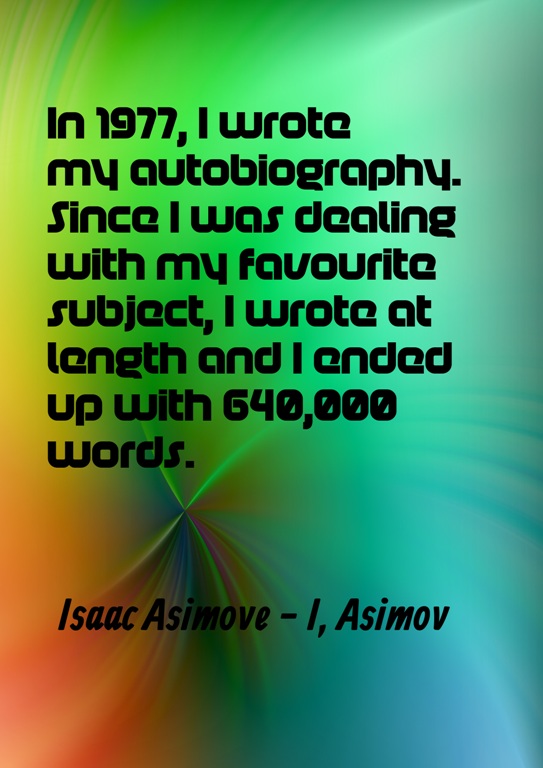
Asimov Quote

What to Put in your Author Media Kit

Having a ready to go press release kit is something every Indie author should have. It’s also a good idea to have it on a static page on your website or/and blog. Rather have everything in one place than have to scramble around when it’s called for. Having it on your website means that anyone who would like to post reviews of your books on their own sites can just grab what they need without the need to try and contact you first. I’m working on my website at the moment so the link here is down, but if you want great examples, just do a Google search of some of your favourite authors.

Include your author photo – a nice size and quality image. Some authors change their photos regularly. Danielle Steel has a new picture of herself in extravagant gowns on the backs of each of her books. I don’t think that for a new Indie author that changing photos regularly is a particularly good idea though. It’s going to take a while to build your brand, and get to the point where you’re recognisable. It’s also good for Google searches to stick to a single author picture for a couple of years at any rate.

Next would be your biography. I prefer bio’s written in the third person, but that’s up to you. A bio of around two to two hundred and fifty words is a good length.

Then your press release, which would be details of your latest book, with a nice cover image and blurb, with an excerpt if you like.

You can include editorial reviews, or if the book is already published, some of your other reviews.

It’s good to have a short author Q&A too. Answer questions like what inspired you to write the book, information on the actual book, and anything that you’d like to share that could pique interest in you and your books.

Lastly, add all of your contact information, including links to all of your online sites, links to the book’s trailer and anything else that you have by way of promotion.

It’s a good idea to keep all of this information in a single folder on your computer, as well as a list of all the links to all of your books, so that whenever these details are requested, you can send all that you need to across in minutes. It’s never too soon to start setting this up. Even if you haven’t yet published your first book, you’ll save yourself a lot of hard work later when you do.

photo-1421757295538-9c80958e75b0

How to Get Page Numbers to Start in Chapter One for CreateSpace

Getting the page numbers and book title in the headers starting on the correct page for CreateSpace can have you pulling your hair out in bunches sometimes. You can download an already formatted template from CreateSpace and copy and paste your manuscript into that rather than going for the bald look, or you can make a nice clean template of your own.

Trying to reformat a couple of hundred pages of an already otherwise formatted Word document sometimes causes strange things to happen, so after many trial and errors along the way, I finally figured out that the easiest thing to do was to type my manuscripts without any formatting at all, and then copy and paste them into my own template before working on paragraphs, margins, and styles for CreateSpace. It’s wonderfully simple to do.

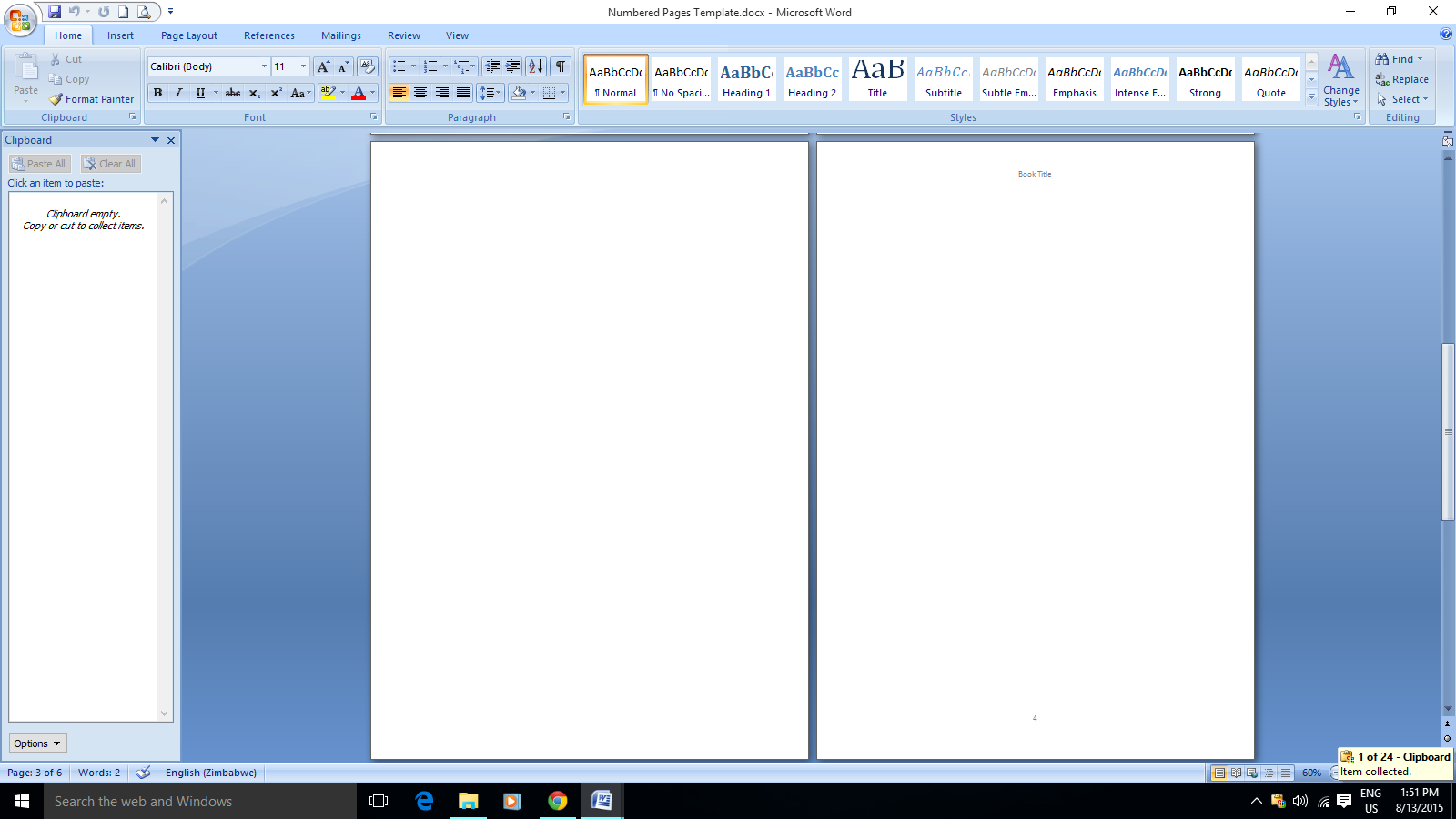
Open a new word document. Hit Enter twice, and then go to Page Layout > Breaks > Next Page to insert a Section Break. Repeat this for as many pages you need for your front matter. Three times is enough though, because you can always add more later.

On the first page of what will be the first chapter hit Enter twice and then Insert > Page Break. Insert page breaks between chapters rather than section breaks.

Double click to open Headers and Footers and unclick Same as Previous on all of them, working your way back through to the first page for your front matter.

Go back to the first page of the first chapter and Insert > Page Numbers. Then double click to open the Headers and Footers again, and you can type in your book title in the header. Save it, and whenever you have a book ready for paper just copy and paste it into your template, change the title in the header, complete your front matter, and Save As your book title. Once that’s done, the rest of the formatting is a piece of cake.

FC Page Numbers

Can You Call Yourself Stephen King? by @JoRobinson176

Apparently. But should you? There’s an author who publishes on Amazon called Stephen King. He isn’t the Stephen King who we know and love though. The four short books of his that I noticed all have two and a half, or two star average ratings overall. One of them has over two hundred reviews. All four of them are being lambasted, but all of their rankings are high, so they’re consistently selling well and have been for quite some time. This writer is obviously quite happy to take the flack while making money.

Many of the outraged reviews sharing that this isn’t the “real” Stephen King would make you wonder why people would keep on buying it. I nearly bought it though. Certain authors like King and Terry Pratchett I always just grab when I see one that I don’t have in my collection. It was only because the cover was so bad that I scrolled down to the reviews. I also don’t read these books as soon as I buy them. Generally they hang about for months in my Kindle – I’ve got some that have been lurking unopened in there for years, so returning them wouldn’t be an option. I could see where such a deception could lead to me posting my first ever one star review.

I’m pretty sure that Amazon wouldn’t let anyone use Stephen King as a pen name, so I’m assuming that this writer really does own that moniker. It must be a fairly common name. He’s not doing anything illegitimate if that really is his name, but I wonder why anyone would want to purposely sell his books knowing full well that readers think that they were written by someone else. And then just carry on doing that after hundreds of complaints. I don’t see any glory in that. When the other Jo Robinson’s books occasionally get added to my lists, I always request that Amazon remove them. I don’t want to reach readers by hanging on to the coat tails of an already very successful author. Slow and steady is good enough for me.

The minute there’s a breakout success, thousands of writers latch on and try to emulate the bestseller. The thing about breakouts is that they are in some way unique. They challenge, inspire, are relatable, or in some way emotionally moving or funny. Carbon copies of them might possibly give a reader some pleasure, but it will never be the same as the original. We need to be our own breakouts. If we believe in our work there is no need to think for a moment that tricking readers into thinking that we’re the real Danielle Steele will lead to anything but rage, just because we have the same name. E L James did manage to luck out by piggy backing Twilight, but that’s a one in a million kind of thing, and a whole other can of worms. Write what you write, follow your own star, and be proud and brave enough to make sure that readers see the real you.

12247844751816776100wsnaccad_feather-pen.svg.hi

Can You Change Paper Trim Size and Colour on CreateSpace?

Before publishing your first paper book with CreateSpace there are a couple of things to consider. Even though you can update it and change the content, once the book has its ISBN and is live for sale you can’t change its size and the colour of the paper. Also, once it’s linked to its Kindle book on Amazon they keep a certain amount of printed books in stock for their quick delivery system, so if you find any major errors in it and rush to fix them, those in stock books will still have to sell first before the corrected ones become available. You could order them yourself I suppose, but I’m not sure how many are printed for this and I don’t see how you could get them from Amazon’s other country sites.

Most of the CreateSpace books that I have bought are 6” x 9”, mostly printed on white paper, as are two of my own books, but there are actually quite a few size choices. I wanted to change the first book in my series to 5” x 8” with cream paper and only then discovered that it couldn’t be done, so now I have no choice but to use the same for all the books in the series. It’s not the end of the world, but it’s nice to know these things before rather than after publishing.

When you’re ready to publish in paper, take your time making sure you’re totally happy with all of your choices. First grab a handful of books from your bookshelf and see what finished product you prefer. Measure those puppies. Unless you have lots of pages, the 5” x 8” with cream paper looks really good. I will only be using cream paper for my fiction books from now on because I love the way it looks and feels, and you don’t see many fiction books with white paper. CreateSpace actually does a great job quality wise when you compare their finished products to some traditionally printed books. White seems the obvious choice for non-fiction, although that would depend on the look you’re going for.

Once your paper book is live and for sale on Amazon you can’t unpublish it and take it down and then republish it again if you hate the way it looks, because they won’t allow that in case someone who bought it wants to sell their copy. It’s so easy to chop and change or even unpublish eBooks that we’re not happy with, but once the paper books are published and selling, it seems they’re forever.

1194985952866884806stack_of_books_01.svg.hi

Should You Give Up Writing?

I’ve always found the different ways that we scribblers describe our experiences with writer’s block very interesting. Also the different ways the seasoned writers suggest getting over it. Some suggestions are to work around your block, or force yourself to write through it, even if what you write is rubbish. Other advice is to write something completely different. We won’t mention those rather hurtful cries of, “Stop being such a wussy. Adorn yourself in adult underwear! Plumbers don’t get plumbers block!” All of these things can work with a bit of effort and confidence, but one bit of advice that you seldom see is to take a break from writing completely. As if a week away from writing anything will totally strip you of the ability to write at all. It is true that if you don’t do something for a good long while, you could get a little rusty, but you should never think that just because you haven’t written for a while that you can’t do it anymore. Talent is a real thing. It grows and blossoms with use, but I don’t believe for a second that it is something that can be lost.

No life is smooth sailing all the way, and sometimes you have no choice but to put a writing project aside. Then time goes by, and as it does, your confidence gets chipped away, and the thought of dusting off that manuscript and starting again can seem daunting, so we fearfully side-step it, and do something else. The task seems like one we’ll fail at, because we never finished it in the first place. Apart from our inner carers trying to stop us from writing at all to save us from the ridicule and laughter if we get it wrong by trying to distract us all the time with desperate urges to polish the silver or watch the entire Hobbit trilogy in a single sitting with popcorn and ice-cream, we sometimes have family and friends who aren’t overly supportive, and occasionally downright unkind with suggestions of quitting the lounging around on our bums at home all the time, and why don’t you get a proper job, kind of thing. In addition to all of these challenges life continues, with all of its challenges, hurts, and stumbles, so sometimes even sitting down to confront that silent blank screen seems impossibly hard.

This is where we come to the stories of those who did this very thing in the face of apparently insurmountable odds, that most of us will never have to face. Those inspirational scribbler guys who fought their demons within and without, and beat down that blank screen of emptiness. If you’re called to write, then do it. It doesn’t matter what anyone thinks of you for doing it. Nothing that ever happens to you can ever take away your talent, and neither can time. Do what you have to do. Your talent and callings aren’t given to everyone. Don’t ever let it fall away untried. Maybe a bit of soul searching, or focusing on your present. Write a crazy bit of flash fiction only for you – way too crazy to share with the world, to get those scribbler muscles oiled. Or better yet, take a deep breath and haul out that manuscript that you’ve left lying for whatever reason, with the names of the characters that you’ve forgotten. Gently blow the dust off, and settle down to read your words without any expectation, and pretty soon I’ll bet you’ll be banging away at that keyboard again, forgetting to take off your ‘jammies and mindlessly munching nuts. Never give up scribblers. Write the books inside you, because you really can if you want to, and your words will live forever in the hearts they were intended for.

Pink Daisy

Indie Rage and Public Relations

The Indie author does much more than write. There are all the learning curves, fiddly bits, and marketing. We are our own publicists. Hugely successful authors like Ann Rice can have as many wobblies as they want to online, but they’ll still be selling lots and lots of books. She’s also traditionally published anyway, so what she does doesn’t besmirch Indie world. I’ve seen enough shame inducing, call your mom a donkey dramas lately from some Indie authors online to wonder what the spectators who just read for pleasure must be thinking.

If you’re online as much as we must be, and on so many various sites, sooner or later you’re going to stumble across a comment or an article that will insert itself firmly up your nostril, and it’s possible that you will then dive right in there and firmly express your opinion. Before doing that though, try and dial up your inner public relations department, and see what that lot have to say first. If it really is something close to your heart, and commenting would be of some benefit, go for it. I’ve been known to get into scraps when it comes to animal cruelty, and that isn’t likely to change, because it’s hugely important to me. Otherwise, take a little breather first, and ask yourself if your getting loudly or publicly involved is worth it.

These past few weeks have been quite tumultuous in Indie world, with authors taking sides about Amazon’s reviewing policy, that whacky Twitter thing that E L James did, and the KU payout barney. A large group of authors is signing a civilised petition about the reviews to formally submit to Amazon, I’m sure E L James doesn’t give a hoot, and the KU payout is done and dusted. Unfortunately, many authors are using their platforms to really make some noise. This is fair enough – we can all say exactly what we want to on our own sites, and we can always delete posts later if we change our minds.

Not so much though. I’m pretty sure that Amazon is very well aware of some of the really strong things being said about them, and by who too. I noticed that the authors shouting the loudest about Amazon being criminal, thieving, swine still have their books with Amazon for sale. It’s never a good thing to try and bite the hand that feeds you. Rather get your views across in the calmest, most civilised way you can. Also, even when you delete a ranty post, you’re not guaranteed that it’s gone forever. The review that Ann Rice wrote on her own book’s Amazon page has been long deleted, but it’s still very easy to find on line if you want to read it.

So before you go in all guns blazing, ask yourself if this would be something you’ll fondly remember when you finally whack out that bestseller, and all your adoring fans want to know every little thing about you. The internet is for keeps, and dignity and respect are kind of nice to have in our Indie world.

Angry Writer

Useful Free Tool for Writers

I downloaded the trial version of Scrivener a couple of years ago, but at that point it all went completely over my head. So many people seem to love it so much that I downloaded it again recently, and after completing the tutorial realised that it isn’t all that complicated and quite a brilliant tool. I don’t think I’m going to keep it though, because it seems limited when it comes to inserting images for eBooks, and I quite like using Microsoft Word. When the new 2010 version arrives at the end of this month there will be a whole lot of useful new functions for us scribblers to use too, including having multiple browsers viewable on your desktop simultaneously. My favourite things on Scrivener are the corkboard and the ability to open two different documents at the same time. I already can, and do, open and work on two documents at the same time with Word though – very handy, and I use a simple but also very useful software called AllMyNotes. It’s a free download, so just click on the name if you want it. Go to the download page and select the free version.

It’s not specifically created for writers, but it serves me as my “corkboard” when I’m writing. All you do is create a folder for each project, and also for the private things on your computer that you want to be able to access quickly. Then you create separate notes within each folder for all the things you need. For instance, you could create one for links to any research material for your book elsewhere on your computer. You can insert tables, add pictures, or just type in the text that you want. Say you create a note for characters, another for timeline or locations and scenes, one for ideas, and another for your launch preparations, when that folder is open you get a corkboard effect and you can find what you’re looking for in seconds, rather than having to trawl around looking for and opening another document. (I’ve temporarily deleted my notes for the screenshot because this isn’t published yet, and I don’t want to be clouted for lobbing spoilers around) Click on images to enlarge for a better view.

Untitled

If you’d like to see if this will benefit your writing life, then install it and play around, and then just uninstall if you don’t like it. When you set up your first folders and notes, right click on each one to choose an icon for it, like the light bulb for ideas, or the book for the folder itself. You get to play around with the colours and backgrounds, and you can move them around by clicking and dragging. Drag the corresponding note into the folder. Sometimes I drop them in the wrong place, but that’s alright, just click and take them back to where they should be.

You can set up the amount of columns and rows in the tables, and also drag to adjust the width, so for your characters note you could have things like hair colour or species all in one spot side by side. I find this a fabulous help for my sci-fi/fantasy series, and list things like a particular alien’s looks, name, home planet, particular abilities and other things that are easy to forget, especially in a series. I have three separate outline notes for my full length books, one for the beginning, and others for the middle and end.

All My Notes

If you’re writing non-fiction, or even fiction that you have a lot of research notes for on your computer, make another note for that, and using the link feature it takes a second to hyperlink, and when you click on it, it opens the document straight away, without you chancing getting distracted while looking for it yourself. This is not something you’re going to have to invest lots of time learning how to use – you’ll get the basics immediately, and find more uses for it as you go along.

Obviously this is no replacement for a great writer specific programme like Scrivener, but not everyone fancies paying the forty odd dollars it costs, and in my case, I prefer total control, using Word for eBook creation, and All My Notes for my corkboard and everything else. It’s really easy to use, so if you sometimes find yourself wishing you could have all you need for writing your book right there at the click of a button, give it a try.

How to Create a NCX Table of Contents for Amazon Upload Using Calibre

I have to say that as well as proofreading, creating a NCX table of contents is something I would be more than happy to outsource to a professional and pay for. I’d recommend that if you can afford it. Considering my mission to learn all the aspects of self-publishing myself though, as well as the fact that not all Indies have the couple of hundred bucks in their budgets for this, I decided to figure it out myself. I must admit that I wasn’t keen to load any file on to Amazon that wasn’t a nice clean HTML conversion, so I updated my already published books using Calibre with some trepidation. They all worked out very nicely, and now that I understand the logic behind this method I’m all for it. The table of contents we did before works very well for getting a nice clickable table in the front or back of your book, depending where you want to put it, but it doesn’t generate a table of contents in the Go To menus of kindle devices, so this new process should be the one we use because a Logical NCX is mandatory for Amazon.

First of all forget all the heading styles. We’re going to stick to Normal Style for chapter headings for this. Obviously centre them if you like, but keep all your formatting plain as you can.

Choose a page for your book’s table of contents. I used the page directly after the copyright page.

Type out your heading titles or simply Chapter One and so on.

Now you must bookmark each chapter heading in the book individually. Go to each one and highlight it, then go to the Insert ribbon and click on Bookmark. Type your bookmark name without using spaces, for instance, chap1, then click Add. Carry on till you’re done, and then go back to your typed out table of contents, highlight the words Table of Contents and insert a bookmark called toc.

TOC Add Bookmarks

Go through your typed table of contents by highlighting each item, then right click and choose Hyperlink. Select “Place in this document” from the menu in the box. Pick the associated bookmark and click OK. Do this till you’ve done them all.
Next, using the Ctrl Click function from your table of contents, go to each chapter heading and use Highlight > Insert > Hyperlink to link them all back to the bookmark labelled toc.

TOC Link

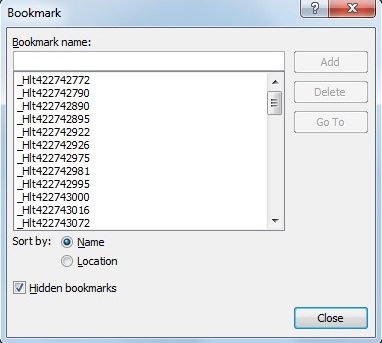
Remove all hidden bookmarks by clicking on Insert > Bookmarks to open the box. Click the “Hidden Bookmarks” box and find any bookmarks that you haven’t added yourself and get rid of all of those by clicking on them and pushing the Delete button in the box.

TOC Hidden Bookmarks

Now save your manuscript and make a copy – just in case, and then use the Save As – Webpage, filtered to get your HTML copy. Don’t worry about the warning that pops up. Save it anyway.

Open Calibre and select Add Book from the top left. Download it for free if you haven’t yet. Find and click on your HTML file. Then click on Convert Book, also in the top ribbon. Fill in the title and your name at the top – this makes it easier to find later. Load up the book’s cover. Don’t load your cover as in the screenshot. You don’t need to for this ePub, and you will upload it on it’s own on Amazon..

Calibre.jpgconvert

UPDATE:  Amazon will no longer be accepting MOBI files that have not been created using their own software.  I will leave the screenshots as they are below, but the procedure will be slightly different.  This is how to do this now. Select ePub output in Calibre.  Select Force Table of Contents.  Click OK.  Open your Kindle Previewer.  Click Add Book.  Browse for the ePub by going to your Calibre Library situated in the My Documents folder, and select the ePub book you will find there.  The previewer will tell you that it has created the file using KindleGen.  You will find this MOBI file in the same folder that Calibre created with the ePub in it.  Use this MOBI file to load directly on to Amazon.

Go and have a look in each of the boxes down the left of your screen, mainly to familiarise yourself with all options. There’s no reason to be wary of playing around – just delete and start again. Select ePub as OUTPUT in the top right of the page.  Go to the Table of Contents and select Force Table of Contents.  Push OK and wait for the conversion to finish.

Calibre force

When Click to Open appears under the cover picture, click on that, and it will take you to the ePub copy in your Calibre library. When you create a MOBI file for your own purposes, clicking on it and it will open in your Kindle for PC.

Calibre TOC in Kindle PC

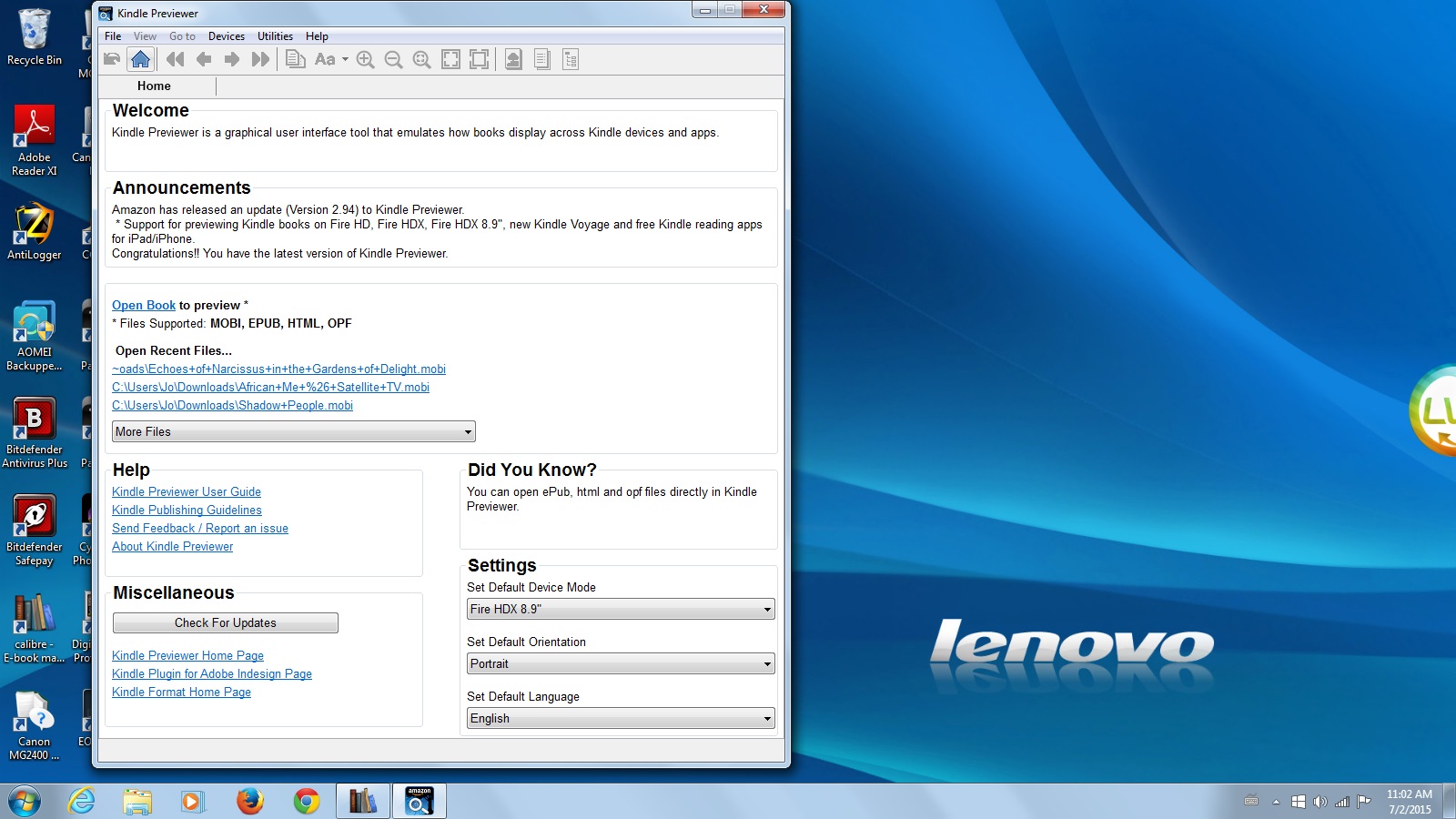
Open the Amazon Previewer.

Calibre Previewer

Have a look how it will appear on the three devices there, and check that both your table of contents and also your NCX table of contents are there from the buttons at the top. Then go to the MOBI file that the previewer has created situated in the folder in your Calibre library and that will be what you load up to Amazon when you start the publishing process. Do a double check by downloading the preview MOBI from Amazon after that, as well as using their online previewer to be a hundred percent sure that all the formatting and breaks in your book are looking good, as well as your NCX table of contents.

Calibre Previewer tocCalibre Previewer ncx view

Last but not least. Typing in the correct code and splitting a book up to generate a NCX table of contents is obviously the correct way to go, but not for people who don’t understand HTML much better than most intrepid Indies. You can happily load the Calibre and Previewer MOBI up this way, because you are following their guidelines properly. The way I understand the NCX TOC is that it’s some sort of hidden “spine” in the metadata of a book. Calibre does all that magical stuff for us. and the previewer does the rest without us having to learn computer coding at all..

Is Kindle Unlimited Hurting New Indies?

I was planning on posting the new TOC how to using Calibre this week, but I’m afraid that I haven’t been able to get to my computer to get the screenshots together this week – so next week it will be – promise. Getting back here today though, it seems that the whole writing world is up in arms about Amazon’s announcement that authors will earn by the page read, rather than by the percentage of a book read when a book is borrowed with Kindle Unlimited. Having vivid memories of starting out as a newbie to self-publishing of how easy it was to get totally confused and thrown off course by announcements from some established authors, I’m really glad that this didn’t happen back then.

It’s a fact that any Indie author out there right now with one, or maybe two books published, is not going to be laughing all the way to the bank. It’s also a fact that readers buy from sources other than Amazon, especially in places like Canada where Kobo is popular, so if your book is Amazon exclusive those would be readers who wouldn’t have the opportunity to buy it. Then again, even if your book is available at all of these other outlets, that doesn’t mean that anyone will buy them there. Two of my books were on all of those sites for quite some time, and I have to risk being shot down in flames here, and truthfully say that since they’ve been taken down from them a very short while ago, they’ve earned more from KU downloads than they ever did there.

I’m not being an Amazon groupie here – I’m well aware that there are authors who truly hate them. I don’t hate them. I just think that we, as self-published writers, need to get things a little more in perspective. We aren’t obliged to put our books on KDP Select. All it means if we don’t is that we don’t have any Amazon free days and a couple of other perks. We can still make our books free regardless by putting a free price on them at Smashwords, and asking Amazon to match the price – this is how we get to having permafree books. Before, when a reader downloaded a book using KU, all that was required for the author of a twelve page book to get the same payout as an author of a two hundred page book, was for the reader to read ten percent of the book. Now authors will be paid for pages read. I don’t see what all the fuss is about – page for page sounds fair to me. As writers I would have thought that we’d be more concerned about readers reading our entire books because they love them, rather than getting cross with Amazon for evening out the playing field.

When I’ve been asked, I’ve always advised newbies publishing their first book to start out the gates with three months on KDP Select, and I stand by that. The authors feeling this particular crunch in their pockets are authors who are already earning minimum four digit monthly incomes from their books, mainly because of loss of actual sales. When it comes to the newly published author, would you rather get a share of the KU pot for a borrow of your book, and the potential of new readers who might not otherwise have been prepared to actually pay for it, or dig your heels in on principle and sell none at all? If Amazon were to close its doors to Indie publishers tomorrow, how well would we all be doing sales-wise? The angry comments about Amazon giving better promotion to Select books also confuse me a little. On the one hand there are the questions of what the benefits are to being Amazon exclusive, while at the same time complaining that those who are Amazon exclusive are getting preferential treatment. That question seems to answer itself right there.

UPDATE: I’m moving this very helpful information up from the comments section. It’s from bestselling author and self-publishing expert Chris Mc Mullen. Click on his name here to go to go and read a great related article on the difference between borrowing and lending on Amazon.

“ I don’t think Amazon specifically favors Select books. However, every KU and Prime borrow helps the sales rank, even if not read to 10%, and there are many borrows not read to 10% that don’t show in the sales reports. That means Select has a larger impact on sales rank than the shown borrows + sales would suggest. That sales rank boost really helps visibility.

But that’s not the only thing. Select books will earn over $100M in royalties in 2015; that’s a huge market. Which lessens the market outside of Select. But that huge KU customer base clicks on the Kindle Unlimited filter in search results, which eliminates all the books that aren’t in Select. Obviously, that helps Select books with visibility, too.

Amazon doesn’t need to do anything special to favor Select books. The reward is built-in. ”
Thanks Chris!

Amazon is what it is – the biggest and best way for self-published writers to have the opportunity to sell our wares, with the added possibility of eventually earning enough from our writing to quit our day jobs – with quite a bit of hard work to come and more books, I hasten to add. Most of us aren’t anywhere near that point yet, so yelling about this and taking our books off KU because of this honestly sounds counterproductive to me. So to any brand new Indies out there about to boycott Amazon because of this, please think twice before you do, and consider what is best for your own book right now, rather than any cash you could potentially be losing if you’re currently making less than fifty dollars or so a month. KDP Select isn’t a life plus seventy year contract holding you down – it’s three months – test it for yourself first.

Owl Holding Kindle

Can you Make and Sell an Audiobook if your Book is on KDP Select?

Yes you can. Short books and audiobooks are the in thing right now. Lots of Indies are working with ACX to have their books made into audio to sell with Amazon’s Audible. You can either pay a narrator and keep all your royalties, or you can opt to share the audiobook’s royalties with the narrator, in which case you pay nothing upfront. Unfortunately this service isn’t available to authors anywhere other than the United States and the United Kingdom. I would definitely use this service if it was available to me, and if any of you scribblers haven’t yet explored the possibilities of audio, it looks to be well worth the effort to have a look.

I have seen a few authors who refuse to have any part of Audible, because of their seven year exclusive distribution rights and insistence on the use of DRM though, so not everyone thinks that this is a great opportunity. Either way, the good thing to know when your book is published with Amazon KDP Select, is that while you may only distribute the digital eBook through them, this doesn’t apply to paper books or audiobooks, both of which you can sell and distribute anywhere you like. Only the eBook has to be Amazon exclusive, and even though the audio book is also digital, it’s not part of the deal. So if you can’t use ACX because of where you live, or if you don’t want to for some other reason, you could be losing potential readers – or listeners as the case may be – without having your book available in all possible formats. All is not lost though.

If you’re brave enough, you could narrate your own books. You could use an online service, such as Podiobooks who actually assist you through the whole process for free, as well as offering paid services, or you can go it totally alone, using free software such as Audacity. Another really fabulous freebie in the Indie author’s toolbox. In fact, I suggest downloading it purely for the fun of playing with it. It’s incredibly easy to use, and as with Calibre, there are loads of helpful tutorials available. It is recommended that you buy a decent USB microphone, but to begin with you’re going to need a lot of practice, so using your laptop to record will be good enough until you’re ready to begin reading your actual book.

As well as using it to make audiobooks, it’s perfect for creating your own podcasts. I’ve been preparing a few of my own, ready to share in a few weeks time when I release my next book. So scribblers, download it and see how you like the world of audio, and the possibility of a totally new format for your stories to reach the world. Once it’s installed simply hit the red record button and say something. Play around with it and look at their tutorials and forums. If you have any short stories or flash fiction lurking on your computer, they would be ideal to use to practise, and your readers will get to hear your words in your own gorgeous voice.

Microphone

Amazon’s Logical TOC and Author Review Rules

I’ve posted about reviews and inserting a table of contents into your eBooks before, but I wanted to discuss them again, with special emphasis on Amazon KDP rules.

First, just a quick word about the table of contents. I’m editing a non-fiction book that I want a proper NCX table of contents for, that shows up in the little Go To menu itself, so I’ve been exploring Amazon’s guidelines. I wasn’t aware before that fiction had to have a logical table of contents, but it is now actually a requirement, and authors are starting to get notices from them to put them in their eBooks if they haven’t already. The HTML table of contents that we did here previously is Strongly Recommended by Amazon as well, but the Logical one is a requirement. This table of contents according to Amazon “Lets the reader easily find parts, sections, and chapters of your book from the Kindle Go To menu. Lets the reader see how far along they are in the book. Especially important for books longer than 20 pages.”

This is not an easy process to find out about. I dug around for weeks finding all sorts of conflicting – and mindblowingly confusing – instructions, that seemed to me only a computer programmer would understand. At the end of all that I found that if you convert your HTML manuscript with HTML table of contents in it to an ePub using Calibre, and then load the ePub on to Amazon, the NCX Logical table of contents appears in the Go To menu. Later, after I’ve finished successfully converting all of my own books, I’ll do a proper post with screenshots of the whole process. In the meantime, it’s something for you to start looking into if you haven’t already got these in your eBooks.

Then the reviews. Amazon is on the warpath right now as far as paid for and dishonest reviews are concerned, and us innocent Indies could get hurt as a result of being uninformed. Whether we agree with them or not, we have to follow the rules of any publisher we use, so getting to know Amazon’s policy on this is important. As authors we are allowed to review books by other authors there, unless we have a personal relationship with them, or had a part in creating their book. So, if you’ve designed a cover for a book or edited it, or had any other part in getting it made, you are not allowed to review it on Amazon. Friends and family are only allowed to chat about your book as part of an editorial review which will have to be vetted via Author Central first, or on the Discussions feature – where it says “Start a Discussion” at the bottom of your book’s landing page. They are not allowed to review it on Amazon. Obviously, no paid for reviews other than paid for editorial reviews, for example from an expert in your book’s genre.

By paid for, Amazon also means that if you receive a gift certificate for a book in exchange for a book review this is a paid for incentive, as is asking for a review as a condition for entry into a competition, among other incentives. Swopping reviews with other authors is also not a fabulous idea. As Indies we want to support each other, and we are so grateful when we do get a wonderful review, that we buy and read the reviewer’s books, and leave our honest reviews for them too, but I think that doing that now would be dangerous – for both of you. Amazon may frown on the author whose book you reviewed as well as you if it looks like a “review for a review”. So, if you really want to review a fellow author’s book if they have already reviewed any of yours, rather do so by posting it on sites other than Amazon, such as Goodreads and your blog. At the end of the day, if we want to carry on publishing with Amazon, we must abide by their rules. Even though we know that we truly are posting one hundred percent honest reviews, there are quite a lot of people who don’t, and getting your books booted off Amazon – which is a possibility here – would be an absolute disaster for any new Indie author out there in today’s publishing environment.

1197107206400036309metalmarious_Laptop.svg.hi

How to Make an eBook Using Calibre

On the subject of selling eBooks from your website, in addition to offering them in PDF format, it’s nice to be able to offer your readers books in the formats of their choice, including Mobi and ePub. Apart from the sales point of view, you might simply want to put a book together for your own pleasure – to send to your friends and family just for fun. The way to do this quickly is with the free Calibre software, so I want to show you how easy it is.

I’ve often mentioned what a great little tool Calibre is for us Indie writers. Together with Amazon’s free Kindle for PC downloadable app, Calibre can be a major help in spotting those typos and grammar gremlins in the editing process. Apart from that though, it’s a library in itself, where you can store any digital books that you like. Like those books you’re sent when you win online Rafflecopter giveaways, or books emailed to you by author friends. It’s useful to have them all in one place so that you don’t lose them in the pile of “stuff” that we scribblers tend to build up on our computers, and commit the sin of forgetting to read something you should.

I won’t go into all the fun stuff you can do with Calibre before we make our little book except to mention one fairly important thing, because the manual is very easy to follow, and the programme is easy to use. The one thing is the ease with which calibre converts book formats if they are DRM free. My preferred reading platform is Mobi, so I generally use Calibre to convert ePub books so I can read them the way I like on my Kindle. Even though I do have an ePub reader, I just don’t like it. But I do know that there are others who go the opposite route. That’s readers for you, so it’s nice to have this option. Simply add and select the book you want to change, and convert it from the input format by selecting your chosen output format.

Once you’ve downloaded and installed your Calibre software, you’re ready to start making your eBook. When you open it, it will look like this – obviously without any books in the library other than the quick start manual, which you should have a quick look at – it’s not long. If you really want to explore all Calibre’s capabilities at a later stage there are loads of tutorials online.

CLICK ON IMAGES TO ENLARGE.

Calibre1

We’re going to make a Mobi book now, but you’ll see that there are quite a few output book formats for you to choose from. Before you begin, you’ll need your book cover file, the same size and quality that you would use to load on to Amazon, as well as your Manuscript file, also formatted the way we did for Amazon, and saved as a HTML file to use here as well.

Calibre Save As

Ready? Click on Add Books in the top left hand corner, browse for your manuscript HTML file and load it up. You’ll see the new title in your library now. On the right of the page you’ll see that the current formats are ZIP – this is fine.

Calibre2

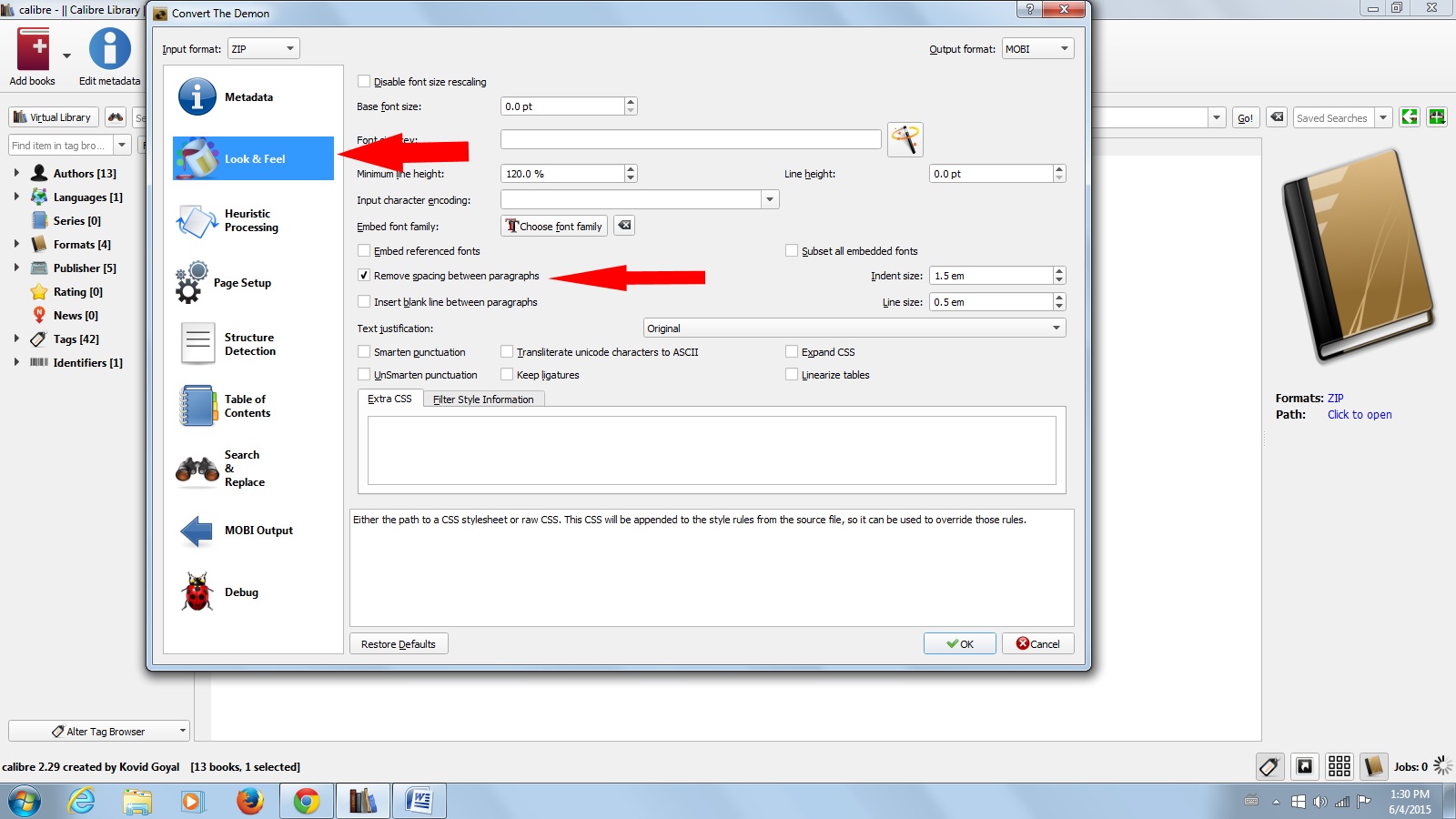
Next click on the third button from the left at the top – Convert Books. Here is where you’ll select your output file in the top right hand corner, and browse for and load your cover, as well as fill in Title and Author on the top right hand side.

Calibre3

Next, click on Look and Feel to the left of the page, and decide whether or not you’d like to remove the space between paragraphs, and check or uncheck as you choose. You can play as much as you like with this, generate and delete as many copies as necessary so you end up with an eBook that you’re happy with. You can check out all the other choices with Page Setup and Table of Contents later – this is generally as far as I go because all of my formatting is already in place in my manuscript.

Calibre4

Click the OK button, and you will see a turning circle in the bottom right hand corner of the page. Shortly thereafter, you will see the Mobi format added to ZIP under your book cover image to the right. Click to open, and there you have it! You can open it on your Kindle for PC, or send it to your Kindle, and you have the Mobi file to email to anyone you like.

Calibre5

Play with the various output formats, and with books with images in them. You can publish loads of perfect eBooks straight from your computer, all by yourself.

Can You Give Away Free Digital Copies of your eBook When Enrolled in KDP Select? @JoRobinson176

No actually, as it turns out. Only via Amazon, and almost never via email attachment. The road to getting most things right as an Indie publisher is a steep learning curve. Knowledge is unlikely to magically appear if you can’t even imagine what questions to ask, and haven’t much of a clue what knowledge is required anyway. Most of us learn from mistakes, both large and small, along the way, and what with the continually changing and growing world of self-publishing, we really are learning all the time.

Having up to now had some of my books published for sale on Apple and Smashwords and all the rest, I wasn’t concerned about Amazon KDP Select rules as they didn’t apply. Now though, after MONTHS of working really hard to get them off Smashwords supplier sites, I’m being as careful as possible not to break any of them. I’ve decided that for this year at least, my current books will be published exclusively with Amazon and CreateSpace. With CreateSpace extended distribution my paper books are still sold by Barnes & Noble, and with the perks of KDP Select, I’m very happy with the status quo.

One rule that many of us might not have known before, is that with KDP Select you can only distribute your eBooks through Amazon. You can send copies to “professional reviewers”, but not to anyone else. This appears to include not being allowed to send out digital books as prizes in competitions. You can only distribute free books via Select’s five free book promotion days every three months. Any eBooks distributed BEFORE you sign up for KDP Select are alright, so don’t panic if you did that while not signed up for Select. You can send your paper books to anyone you like though as prizes – you’ve bought and paid for them after all.

You are not allowed to gift any eBook in exchange for a review, and if you do ever review a gifted eBook, make very sure to add a disclaimer to your review on Amazon. You are not allowed to swop reviews. I do review the books of some authors who have already reviewed some of my books, but only when I’ve bought the book, read it, and honestly liked it. I think you’re safe doing this if you don’t do it often, and are also reviewing the books of mostly unknown to you authors, but certainly don’t make review swopping part of your Indie trip, or you could find your book booted out, and your reviews taken down. If you write books on grammar, writing a scathing review of another author’s book about grammar might be taken as breaking Amazon’s rule of reviewing the books in your own field. All in all, with reviews, authors should definitely tread lightly – and certainly read Amazon’s policy on them so as to be safe, rather than sorry.

In fact, reading Amazon’s terms before we all zoomed off to publish would probably have saved some of us intrepid Indies a bruised knee or two. I’ve figured out that the two US dollars extra I pay for any eBook I buy from Amazon is for the privilege of having an account there as a non-US citizen, and this is fine with me, because it is a privilege. Buying eBooks from Amazon is a lot simpler (and mostly cheaper even with the surcharge) than buying them around here. I could never figure out why my royalty payments were different for my novels when they had the same prices though, until I got stuck into that old fine print. Turns out that your royalty at the higher rate is X minus relevant VAT minus cost per megabyte book file size. Authors pay for the delivery of their books every time a reader buys them. It’s only cents per MB, but it is a good thing to know when you’re planning on publishing a book chock full of images. One of the biggest lessons I’ve learned along the Indie path, is to always read the fine print, and the best advice I could ever give to a new self-publishing author just starting out on this road, would definitely be to figure out the rules first. Happy scribbling fellow Indies.

owl-with-tablet-hi

Should you Sell eBooks from your Website? @JoRobinson176

Many web owners sell books directly, and sometimes exclusively from their sites, collecting one hundred percent of the price via PayPal. If you publish with Amazon KDP Select, this is obviously not allowed – in fact, if your book is with Select, you are only allowed to distribute the digital books through them, and only the selling of your paper books after ordering them from your POD supplier is considered kosher.

If you’re not with KDP Select you can sell them anywhere you like, so the website option then becomes viable, and a very good idea too. As an independent publisher you get to try a variety of avenues for selling and marketing your books. We all know about Smashwords and all the other sites where you can make your books available to buy. It’s quick work to load them up there – although – not such quick work to get them taken down by the way. I unpublished two of mine from Smashwords months ago, and I’m still trying to get Barnes & Noble to remove them from their site so I can enrol them in Select again.

So there are all these options open to you for spreading your books far and wide, but do consider having one or two for sale directly from you. I’m in the process of getting a couple ready for this very thing. Many of us use WordPress.com. Me, because the thought of hosting my own website terrifies me, but moving to WordPress.org in the future will be necessary because of Google visibility.

You can’t install a PayPal button and sell your books from WordPress.com, although that needn’t be a hindrance. Why not set up your own website with a link to it in your sidebar? Setting one up is only a little work to begin with, and then occasional updates after that. A nicely designed static website is a great thing to have to use for all your future promotions, sales, new releases, and a great way to showcase yourself and all of your books.

A couple of free website hosts are Weebly, and my favourite, Wix. It shouldn’t take you more than a day to get it looking nice and professional. One little tip though – take your time picking your theme and theme fonts, because once you publish and go live you can’t change those. It’s up to you how much you use your website. You have the option of a blog to go with it, which you can use weekly, bi-weekly (or not at all), and share links to pages from there to all your social networking sites regularly, so it needn’t be something that stagnates. Wix has a lot of really lovely, and easy to use features, and setting up your PayPal button is the work of minutes.

Once you’ve got your book written, proofed, and beautifully formatted, convert it to an eBook format (or a selection of formats, such as PDF, Mobi, and ePub) using free downloadable software such as Calibre. Calibre is a great tool for Indie authors to have, with many useful functions other than book conversion – which is a whole lot more words, and best kept for another day. The important thing is how easy it is to use, with step by step instructions, your books will be ready to sell very quickly. Obviously these books will not be protected from customers emailing copies to their friends, but the same applies to every eBook you ever send as a prize or review copy, so that is a thought – the ever present and growing piracy. The customers who do buy it from your website are unlikely to be buddies with each other though, so you probably won’t lose any sales if they do send it on to their grannies and so on, and pirates prefer not to spend a dime at all mostly.

Whether you write something specifically to sell yourself, or experiment with a book you’ve already written that may not be doing so well, it is always an option for the Indie writer. Some authors are making a lot of money this way, especially those in the health and recipe book sector, so if there is a book lurking in you that would help or add value to readers enough for them to buy straight away, rather than taking the time to look for it online, go for it! I personally can vouch for the quick finger of the impulse buyer, and I can’t think of one bought this way so far that I regret buying, and the more you are spread around, the more visible you will be – always a good thing.

11970983281171911309SteveLambert_Library_Book_Cart.svg.hi

Have a Little Faith in You

Most normal human beings have inner critics. I think that writers and creative types get to hear them more clearly because we spend so much time inside our heads, which is bad enough, but I’ve heard that we have more to contend with than that rotten little guy who whispers in our ears that our words are rubbish and the world will die laughing if we ever publish them. Apparently it’s normal human behaviour to sabotage ourselves. That’s according to Freud by the way – he called it the death wish, and although I have absolutely no clue what the theory behind it is, I can’t deny that he’s right. This is more insidious than actually thinking that you’ll never succeed. It’s an unconscious attempt to stop you from succeeding by distracting you apparently. Could be we’re born that way, or maybe the ways that we are raised can also contribute to the unconscious belief that you’re never going to have what it takes to be a rock star so why bother trying – rather do the easy thing that you know you’ll get right. Get a proper job and stop reaching for stars you have no way of attaining.

Maybe we’re designed this way so that anything worth doing is going to take work to make us grow. Maybe overcoming obstacles to achieve things, and make more of ourselves is the whole point of why we’re here, and every little thing that you do or don’t do is important. Makes sense. I’ve often wondered about why it is that sometimes just about anything can seem more important to be doing than writing right now. Or the mind won’t stop wandering. No matter how hard you try and concentrate on what you’re trying to write, thoughts of the most arbitrary things constantly intrude. Flashes of how cool it would be to go watch a movie and eat cake. Or dire warnings that if the dishes aren’t washed right now something terrible will happen. It’s hard to concentrate on writing your book when you yourself is trying to knobble you. How do you fight yourself off and finish writing your novel?

I think that maybe the secret is not viewing your inner critic as part of you, and don’t see this strange inner force that’s trying to stop you from achieving your goals as part of you either. Visualise them as little ugly trolls in there, and then visualise a muse for yourself with a sledgehammer beating them right out of there. Writing is hard, and writing is important. The words writers share with the world inspire, teach, and bring joy, so getting your work finished is important. Maybe that’s why writers find it so difficult sometimes to get on with things – maybe the more important the work, the more challenges will be tossed your way to stop you. Apart from your listed goals for your writing, and a little bit of discipline, you must have a hearty belief in yourself and refuse to let these intrusions happen. The minute they creep in, just let them firmly know that you are indeed a writer, that you will indeed finish and publish your novel, and force them out by replacing insulting inner troll words, doubts, and urges to scrub the toilet straight away with the thoughts of future readers enjoying the words and stories that you were born to share. Follow your destiny scribblers, no matter what anyone without or within has to say. This life is entirely yours to choose what to do with, and believing in yourself is vital – you’ll be amazed at how well the words flow when you do. Your job is to make sure that the eyes out there who need to read your words one day have the chance to do so.

1111photo-1421757295538-9c80958e75b0

Image Credit: Unsplash

Do You Love Your Book?

My first book took the longest time to write because I spent a lot of time angsting over every tiny little detail of it, and backtracking all the time, although angst or not, I loved every step of the process. These days I write much faster. A couple of times though, I’ve started a story and it’s taken days just to get a paragraph down. I’m a stubborn old mule though so I generally used to try and persevere, and force myself on. Not anymore though. Even though I’m one of the write every day tribe whether you feel like it or not, and I do write every day, I don’t see any point in carrying on with writing something I don’t love just because I started it.

It got me wondering how many writers try to force themselves to write something that they really don’t want to write, thinking that their daily groan as they stare at the blank screen is simply some virulent form of writers block which will pass if they just keep on trying. These days with all of us scribblers floating around the world wide web, getting started on a new book is a lovely thing to share. We chat about when we think it will be published, and excitedly zoom on in, only to find after one chapter in, that the well has totally dried up. But now everyone knows about it, and if we don’t finish it and publish it they’ll think we’re losers, so we keep on slogging away, pushing any thought of failure out of the realm of possibility.

I don’t think that it’s failure to put aside something that you hate doing. I’ve written a couple of articles that I really didn’t enjoy doing, but I was being paid for those, so I gave them my very best. Books aren’t the same. Could it be that you decided to start writing a book because of a popular and lucrative genre you happened to notice? If you don’t actually enjoy reading that genre, you’re very unlikely to enjoy writing it. Maybe an idea you thought was fabulous a year ago doesn’t truly float your boat anymore, and you’re simply forcing yourself because you always finish what you start.

I think that if you always find it really difficult to add to any specific manuscript, and find yourself forcing yourself to find the words every day for months and months on end, it might be time to take a little break from it and try a bit of freeform writing. Just have at that keyboard and write something that makes you happy. Anything at all that brings on those scribbling joy bubbles. Maybe if you find your fingers flying across your keyboard then, you don’t have grade four hive-inducing writer’s block. Could be you just hate what you’re writing.

Obviously we can have weeks when the writing doesn’t always flow, and days when it just stops entirely. Writing on through even though the words are rubbish at times like these really does work, but if it goes on for months and months on end, then I for one would not endure the torture, and move on to another project. The beauty of being an Indie means that only you get to decide what you write and when. You can also allow yourself to shelve something for a while or forever if you choose to. You never know. Maybe finding it again after finishing something that you really did love to write could ignite a spark again. So be kind to yourself if you ever find yourself falling totally out of love with an idea, and allow yourself to move on.

books-312487
Image Credit: Pixabay

Fiction Writers Can Write Great Non-Fiction Books Too

I have several non-fiction books at various stages of completion which I plan on self-publishing. These are about things that are important to me, things that I know something about, and that I want to share with others. Writing for me is first and foremost because it’s what I love to do – what I always will carry on doing even if I win the lottery. At the end of the day though, the goal for the self-publishing author is to earn enough to support yourself. So it’s good to point out that having a non-fiction book or two out can be a great way for an Indie to create another source of income, and also find new readers for your fiction who might not have come across it if they hadn’t been looking for a How to Groom a Poodle book.

The ebook market is glutted with hundreds of thousands of really bad, quickly cobbled together tiny How To books, published by people who are doing this purely to make money, and mostly from outsourced material. They’ll pay a freelance writer a tiny amount of money to produce a short book on a supplied subject, whack a cover on it, load it up on Amazon, and then move on to the next book to churn out. When I first started buying books on Amazon I was green enough to buy a couple of these dreary, and often badly researched little tomes, but I soon learned my lesson. Now I look for quality How To books when I want them, just as I’m sure everyone else learns to do. Books that have been written with care and attention by authors who know what they’re talking about. They’re easy to spot, and you can see by their rankings that they’re being found by readers who aren’t as easily tricked into buying teeny books pretty much copied from the internet. How To books sell very well because there will always be hobbies and interests that people love or want to find out more about.

Writer’s block doesn’t come into play with these. All you need is your subject, your knowledge, research, and your writing style. If you haven’t considered doing this before, you might be very surprised at how much knowledge you have about your own passions, and also how many people out there would like to benefit from that knowledge. I have piles of recipe books, inspirational books, books on health and fitness, gardening books – the list goes on. When I was still into my horsy show jumping days I bought every book on horses that I saw. Even people who don’t read fiction buy How To books, so as a self-published writer looking to make some money as well as writing their beloved novels, this is definitely a course to consider. You could find that you really love this way of writing too – I do.

So what do you love? It could be a real life subject from your fictional work that you know a lot about. Or a hobby or interest like fishing, golfing, macramé, pet care, or a health issue that you have overcome or learned to deal with. Gardening, herbs, recipe books – all of these things can be just as much of a joy to write about as is your fiction, and possibly have a little better edge when it comes to making money. You can publish them as both ebooks and paper books. CreateSpace can produce some gorgeous large format glossy books that are big enough to lay open on a tabletop, so you can really go to town with images and illustrations. Most modern phones have brilliant cameras, so even if you don’t have a good camera there’s nothing to stop you using your iPhone or similar to capture lovely pictures of your subject matter.

The world of all books is the Indie’s oyster, so stretch your wings and share your knowledge and passion with the world, as well as with your worlds of fiction. You’re so much more than simply a researcher, or expert in a field. You’re a writer. Add your writing skills to your knowledge and experience of any non-fiction passion, and you’re already ahead of the pack.

Newspaper.jpgw